
Claude Watermark
FInd & remove hidden AI traces in your text
- Use Cases
- Not listed yet
- Pricing View
- Not listed yet
- Platforms
- Not listed yet
Decision summary
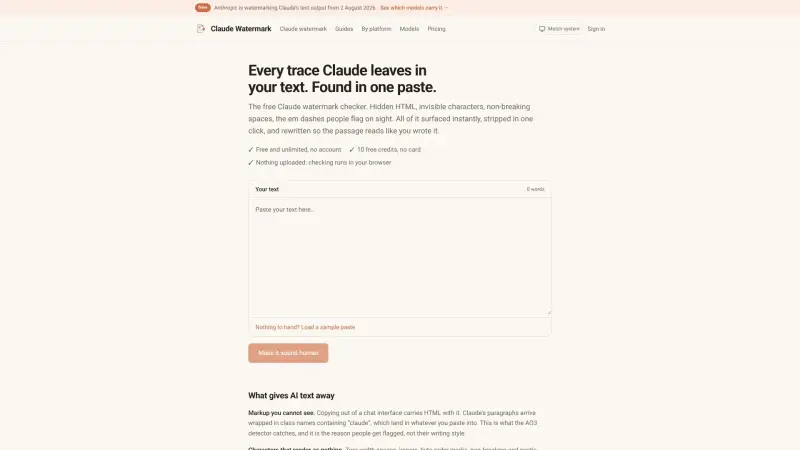
The Claude Watermark is a free, in-browser tool designed for anyone who uses Claude AI and needs to ensure their text is clean and authentically human-like. It helps writers, content creators, and forum users avoid flagging by revealing and stripping away the hidden HTML, invisible characters, and specific stylistic elements that often accompany AI-generated text, particularly from Claude.
Simply paste any passage into the checker, and it instantly scans for "claude" class names, zero-width spaces, byte-order marks, and the frequent em dashes that can give AI text away. With a single click, these traces can be removed, allowing your content to be presented cleanly and without suspicion.
Overview
The Claude Watermark is a free, in-browser tool designed for anyone who uses Claude AI and needs to ensure their text is clean and authentically human-like. It helps writers, content creators, and forum users avoid flagging by revealing and stripping away the hidden HTML, invisible characters, and specific stylistic elements that often accompany AI-generated text, particularly from Claude.
Simply paste any passage into the checker, and it instantly scans for "claude" class names, zero-width spaces, byte-order marks, and the frequent em dashes that can give AI text away. With a single click, these traces can be removed, allowing your content to be presented cleanly and without suspicion.
Details
Key Features
- **Detects hidden Claude HTML:** Identifies specific HTML class names, such as those containing "claude," that are often copied from chat interfaces and flagged by detectors.
- **Surfaces invisible characters:** Reveals zero-width spaces, non-breaking spaces, byte-order marks, and other characters invisible to the naked eye but obvious at the byte level.
- **Flags stylistic patterns:** Counts instances of common AI stylistic tells like multiple em dashes and curly quotes, offering context rather than definitive proof.
- **One-click cleaning:** Provides an immediate option to strip all detected HTML and invisible characters from your text with a single action.
Best For
- **Writers and content creators:** Those using Claude for drafts or content who want to ensure their final output is free of AI-specific artifacts before publishing.
- **Forum and community users:** Individuals posting AI-generated text on platforms like AO3 that have specific AI detection mechanisms and flagging systems.
- **Anyone scrutinizing AI output:** Users who need a clear, deterministic understanding of the hidden elements within text copied from Claude.
Top Use Cases
- **Cleaning text before publication:** Remove hidden HTML and invisible characters that could lead to your content being mistakenly flagged as AI-generated.
- **Identifying specific Claude artifacts:** Pinpoint exactly where HTML class names containing "claude" appear in your text, indicating their origin from a Claude chat interface.
- **Reducing stylistic tells:** Get a count of stylistic elements like em dashes to evaluate if your text exhibits common patterns associated with AI prose.
Integrations
- The Claude Watermark operates directly within your web browser, functioning as a standalone tool for processing text. The available source material does not clearly specify direct integrations with other platforms, APIs, or specific ecosystems beyond its browser-based functionality.
Pros
- Provides deterministic findings (hidden HTML, invisible characters)
- operates entirely in-browser without uploads for privacy
- offers a rewrite pass that may address statistical watermarks.
Limitations
- Cannot directly detect Anthropic's statistical watermark, as the necessary key is proprietary
- stylistic findings (like em dashes) offer context but are not definitive proof of AI origin.
Read full editorial notes
What is Claude Watermark?
Claude Watermark is a free, web-based utility that scans Claude AI-generated text for hidden markers and stylistic tells. It allows users to quickly identify and remove unwanted artifacts like HTML classes, invisible characters, and excessive em dashes, ensuring the text appears clean and human-authored.
What are the key features of Claude Watermark?
**Detects hidden Claude HTML:** Identifies specific HTML class names, such as those containing "claude," that are often copied from chat interfaces and flagged by detectors.
**Surfaces invisible characters:** Reveals zero-width spaces, non-breaking spaces, byte-order marks, and other characters invisible to the naked eye but obvious at the byte level.
**Flags stylistic patterns:** Counts instances of common AI stylistic tells like multiple em dashes and curly quotes, offering context rather than definitive proof.
**One-click cleaning:** Provides an immediate option to strip all detected HTML and invisible characters from your text with a single action.
**In-browser processing:** Ensures your privacy and security by performing all checks locally in your browser, with no text ever uploaded to a server.
**Rewrite pass for statistical watermarks:** Offers an optional rewriting service that processes your text through a different model, a technique that Anthropic concedes may circumvent their statistical watermark.
Who is Claude Watermark best for?
**Writers and content creators:** Those using Claude for drafts or content who want to ensure their final output is free of AI-specific artifacts before publishing.
**Forum and community users:** Individuals posting AI-generated text on platforms like AO3 that have specific AI detection mechanisms and flagging systems.
**Anyone scrutinizing AI output:** Users who need a clear, deterministic understanding of the hidden elements within text copied from Claude.
What can you use Claude Watermark for?
**Cleaning text before publication:** Remove hidden HTML and invisible characters that could lead to your content being mistakenly flagged as AI-generated.
**Identifying specific Claude artifacts:** Pinpoint exactly where HTML class names containing "claude" appear in your text, indicating their origin from a Claude chat interface.
**Reducing stylistic tells:** Get a count of stylistic elements like em dashes to evaluate if your text exhibits common patterns associated with AI prose.
How does Claude Watermark compare to alternatives?
**Compared to plain-text editors:** While plain-text editors can remove some formatting, they don't specifically identify "claude" class names or invisible characters with precise counts and positions, nor do they offer an optional rewrite pass.
**Compared to other "AI detectors":** Unlike tools that claim to detect Anthropic's statistical watermark (which is impossible without their private key), this checker focuses on verifiable, deterministic findings like hidden HTML and invisible characters.
What integrations and ecosystem support does Claude Watermark offer?
The Claude Watermark operates directly within your web browser, functioning as a standalone tool for processing text. The available source material does not clearly specify direct integrations with other platforms, APIs, or specific ecosystems beyond its browser-based functionality.
What are the pros and limitations of Claude Watermark?
Pros: Provides deterministic findings (hidden HTML, invisible characters); operates entirely in-browser without uploads for privacy; offers a rewrite pass that may address statistical watermarks.
Limitations: Cannot directly detect Anthropic's statistical watermark, as the necessary key is proprietary; stylistic findings (like em dashes) offer context but are not definitive proof of AI origin.
Resources
Useful Links
Launched
Ownership
If this is your product, contact us and we can help transfer it to you.