


Hibi Calendar: Daily Journal App
Daily Journal: Doodle, sticker, & bujo diary
- Use Cases
- Note Organization
- Pricing
- Free
- Platforms
- iOS
- Ideal For
- Creatives General Productivity
Overview
Hibi Calendar: Daily Journal App transforms your digital calendar into a deeply personal and creative space, ideal for anyone who appreciates the tactile feel of a paper journal combined with modern convenience. It’s designed for iPhone and iPad users who want to doodle, add stickers, and customize their daily schedule and reflections without compromising privacy or dealing with complex setups.
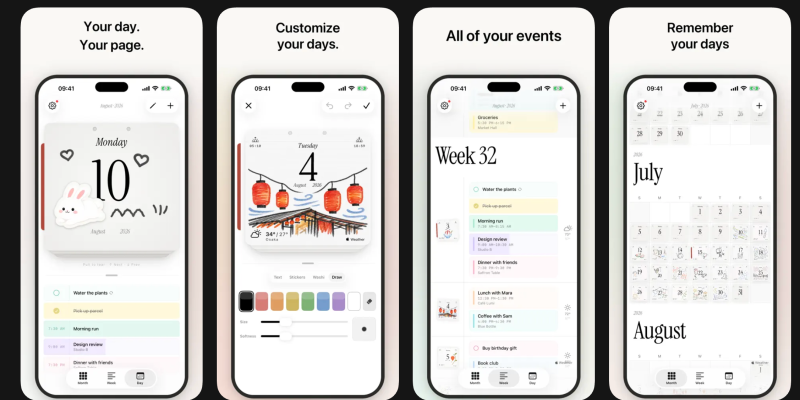
This unique daily journal app re-imagines your calendar as a stack of soft, textured paper pages you can tear away, each a canvas for your thoughts, plans, and artistic touches. By integrating seamlessly with your existing Apple Calendar and Reminders, Hibi provides a familiar yet enriched way to engage with your days.
Details
Key Features
- **Intuitive Calendar Views:** Navigate your schedule with three distinct views: a "Day" view with tear-away paper cards, a "Week" view as a gentle stream of days, and an "Month" view presented as an endless, uncluttered grid.
- **Creative Journaling Tools:** Express yourself by drawing and writing directly on your digital pages, with full Apple Pencil support on iPad for a natural feel.
- **Personalized Sticker Integration:** Add pre-designed stickers or create your own by cutting them straight from your photos, allowing for unique visual customization of each day.
- **Customizable Page Aesthetics:** Choose your preferred paper style, ruling, and color, arranging each page to match your personal aesthetic and organizational needs.
Best For
- **Creative Journalers:** Individuals who enjoy personalizing their notes and schedules with doodles, drawings, and custom stickers.
- **Apple Ecosystem Users:** Anyone already using Apple Calendar and Reminders who desires a more visually engaging and private daily planning experience.
- **Privacy-Conscious Individuals:** Users who prefer apps that don't require an account, avoid tracking, and keep their personal data securely on their device and in iCloud.
Top Use Cases
- **Daily Planning and Reflection:** Organize your tasks and appointments, and journal your thoughts, observations, and moods each day.
- **Personalized Event Management:** Enhance standard calendar entries with hand-drawn notes, custom stickers, or chosen paper styles to make each event visually distinct and memorable.
- **Visual Schedule Tracking:** Gain an at-a-glance understanding of your week or month with beautifully designed layouts that integrate your calendar and personal notes.
Integrations
- Hibi Calendar: Daily Journal App integrates directly with Apple's built-in calendar and reminders system, allowing you to see your existing schedule and tasks without any manual setup.
- It pulls live weather data from Apple Weather to display on your daily pages.
- Your decorated pages sync quietly between your iPhone and iPad via your own iCloud, ensuring your data remains private and on your devices.
Pros
- Deep integration with Apple Calendar and Reminders
- privacy-focused with no required account or tracking
- offers extensive creative personalization for daily entries
- core features are available for free.
Limitations
- Not verified for macOS, which means its full functionality and compatibility are not guaranteed on desktop Apple computers.
Read full editorial notes
What is Hibi Calendar: Daily Journal App?
Hibi Calendar: Daily Journal App is a personal productivity tool for iPhone and iPad that blends traditional journaling with digital calendar management. It allows users to view and interact with their schedule and daily notes through a beautifully designed, customizable interface that mimics a physical paper diary.
What are the key features of Hibi Calendar: Daily Journal App?
**Intuitive Calendar Views:** Navigate your schedule with three distinct views: a "Day" view with tear-away paper cards, a "Week" view as a gentle stream of days, and an "Month" view presented as an endless, uncluttered grid.
**Creative Journaling Tools:** Express yourself by drawing and writing directly on your digital pages, with full Apple Pencil support on iPad for a natural feel.
**Personalized Sticker Integration:** Add pre-designed stickers or create your own by cutting them straight from your photos, allowing for unique visual customization of each day.
**Customizable Page Aesthetics:** Choose your preferred paper style, ruling, and color, arranging each page to match your personal aesthetic and organizational needs.
**Seamless Apple Ecosystem Integration:** Automatically displays your existing events and reminders via Apple's built-in system, requiring no account creation or manual setup.
**Thoughtful Design Details:** Features elegant serif typography, a proper dark mode, hand-picked pastel tints for calendar entries, live weather information from Apple Weather, and convenient home-screen widgets for today's page and upcoming events.
Who is Hibi Calendar: Daily Journal App best for?
**Creative Journalers:** Individuals who enjoy personalizing their notes and schedules with doodles, drawings, and custom stickers.
**Apple Ecosystem Users:** Anyone already using Apple Calendar and Reminders who desires a more visually engaging and private daily planning experience.
**Privacy-Conscious Individuals:** Users who prefer apps that don't require an account, avoid tracking, and keep their personal data securely on their device and in iCloud.
What can you use Hibi Calendar: Daily Journal App for?
**Daily Planning and Reflection:** Organize your tasks and appointments, and journal your thoughts, observations, and moods each day.
**Personalized Event Management:** Enhance standard calendar entries with hand-drawn notes, custom stickers, or chosen paper styles to make each event visually distinct and memorable.
**Visual Schedule Tracking:** Gain an at-a-glance understanding of your week or month with beautifully designed layouts that integrate your calendar and personal notes.
How does Hibi Calendar: Daily Journal App compare to alternatives?
Compared to generic digital calendar apps, Hibi Calendar: Daily Journal App offers a unique blend of creative journaling tools and deep personalization, transforming scheduling into a more engaging and expressive activity.
In contrast to traditional paper journals, Hibi provides the convenience of digital integration with existing Apple Calendar events, seamless syncing between iPhone and iPad, and the ability to easily add custom photo stickers, all while maintaining a paper-like aesthetic.
What integrations and ecosystem support does Hibi Calendar: Daily Journal App offer?
Hibi Calendar: Daily Journal App integrates directly with Apple's built-in calendar and reminders system, allowing you to see your existing schedule and tasks without any manual setup.
It pulls live weather data from Apple Weather to display on your daily pages.
Your decorated pages sync quietly between your iPhone and iPad via your own iCloud, ensuring your data remains private and on your devices.
What are the pros and limitations of Hibi Calendar: Daily Journal App?
Pros: Deep integration with Apple Calendar and Reminders; privacy-focused with no required account or tracking; offers extensive creative personalization for daily entries; core features are available for free.
Limitations: Not verified for macOS, which means its full functionality and compatibility are not guaranteed on desktop Apple computers.
Keep researching Hibi Calendar: Daily Journal App
Explore relevant products with a similar category, audience, or use case.


Launched
Ownership
If this is your product, contact us and we can help transfer it to you.
 ChatGPT,
 Claude,
 Perplexity,
 Gemini

