

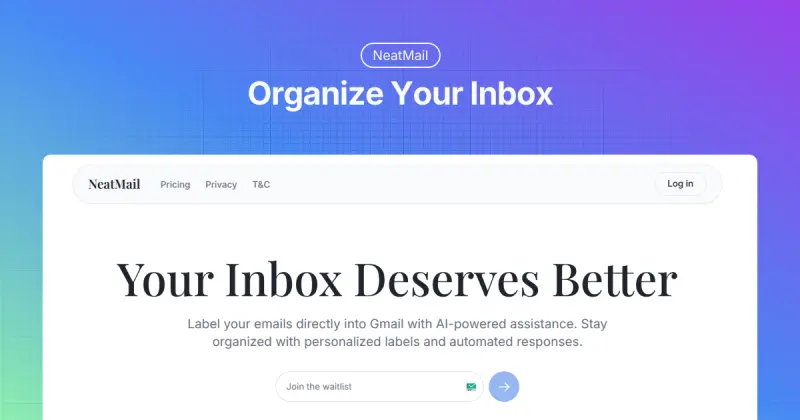
NeatMail
AI-powered email labels that auto-organize your Gmail inbox effortlessly
- Use Cases
- Not listed yet
- Pricing
- Freemium
- Platforms
- Not listed yet
- Ideal For
- Agencies Solopreneurs
Overview
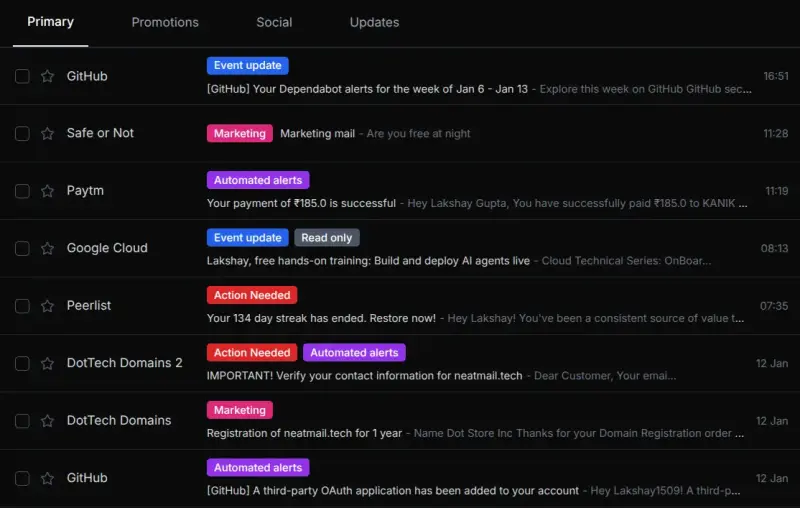
NeatMail is an AI-powered email automation platform that transforms chaotic Gmail inboxes into organized, efficient workspaces through intelligent auto-labeling and smart categorization. Professionals overwhelmed by hundreds of daily emails can finally achieve inbox zero as NeatMail automatically sorts messages into customizable labels like Important, Personal, Promotional, Finance, and Travel without manual filtering.
The platform analyzes email content and sender patterns to apply accurate labels instantly, routing newsletters to dedicated folders, flagging urgent client communications, and quietly organizing promotional content that clutters your focus.
Details
Users simply connect their Gmail account, and the AI immediately begins learning from existing emails to understand personal workflow preferences and communication patterns. Custom label creation allows tailored organization for specific projects, clients, or categories, tailored to your needs, while personalized triggers automate actions such as forwarding receipts to accounting software or moving social notifications to separate views. The system stays organized automatically as new emails arrive, maintaining inbox hygiene without constant maintenance or complex rule configuration.
Key Features
Smart Email Labels: AI automatically categorizes every incoming message with intelligent labels such as Important, Personal, Promotional, Finance, Travel, and custom tags, eliminating manual sorting while maintaining perfect organization across your entire inbox.
Personalized Organization: Create custom labels tailored to your specific workflow, projects, or clients, with AI learning your preferences over time to apply increasingly accurate categorization that adapts to changing communication patterns.
Direct Gmail Integration: Seamlessly connects with your existing Gmail account without switching email clients or learning new interfaces, working invisibly in the background while preserving familiar Gmail functionality and keyboard shortcuts.
Custom Labels: Design unlimited personalized labels for niche categories like specific client names, project codes, vendor communications, or any organizational structure that matches your unique workflow requirements and business processes.
Personalized Triggers: Set up automated actions based on label assignments, such as forwarding receipts to expense-tracking tools, marking certain senders as priority, or automatically moving low-priority emails to weekly digest folders.
Easy Message Search: Find emails instantly using intelligent label-based search that filters thousands of messages down to specific categories, dramatically reducing time spent hunting through cluttered inboxes for important communications.
AI-Powered Drafts: Generate contextually relevant email responses using AI that understands conversation history and communication style, helping you respond faster to routine inquiries while maintaining professional tone consistency.
Stay Organized: Maintain a clean, perpetual inbox as the system continuously learns and improves its categorization accuracy, ensuring new emails land in appropriate folders automatically without degrading performance over time.
Who This Is For
Perfect for busy professionals and executives managing 100+ daily emails across client communications, internal updates, and promotional content who need automated organization without spending hours on manual sorting.
Ideal for entrepreneurs and small business owners juggling multiple roles who require efficient email management to separate customer inquiries, vendor communications, financial notifications, and personal messages into actionable categories.
Designed for remote workers and digital nomads coordinating across time zones who benefit from intelligent email batching and categorization that helps prioritize urgent communications while deferring routine updates to scheduled review times.
Common Questions
How does NeatMail's AI learn to categorize my emails accurately?
NeatMail analyzes your existing email history, sender patterns, content keywords, and engagement behavior to understand how you naturally organize communications. The AI continuously improves by observing which emails you open first, which you archive quickly, and how you manually interact with different message types, adapting its labeling over time.
Can I customize labels beyond the default categories?
Absolutely. While NeatMail provides smart default labels like Important, Personal, and Finance, you can create unlimited custom labels for specific clients, projects, vendors, or any organizational structure. The AI learns to apply these custom labels automatically based on sender addresses, subject patterns, and content analysis.
Does NeatMail work with my existing Gmail filters and labels?
Yes, NeatMail integrates seamlessly with your current Gmail setup without disrupting existing filters, labels, or folder structures. The platform adds intelligent automation on top of your configuration, complementing rather than replacing manual organizational systems you've already established.
What happens to my email data, and is it secure?
NeatMail uses industry-standard encryption with Stripe for payments and Supabase for secure data storage. Your emails are analyzed for categorization purposes but never stored permanently on external servers. The platform operates with read and organize permissions only, maintaining privacy while delivering automated inbox management.
Built with
Keep researching NeatMail
Explore relevant products with a similar category, audience, or use case.



Launched
Ownership
If this is your product, contact us and we can help transfer it to you.
 ChatGPT,
 Claude,
 Perplexity,
 Gemini

