


BlackStack
Save time and increase response rates by deploying personalized messages instantly across all your tabs.
- Use Cases
- Not listed yet
- Pricing View
- Subscription
- Platforms
- Not listed yet
- Ideal For
- Not listed yet
Overview
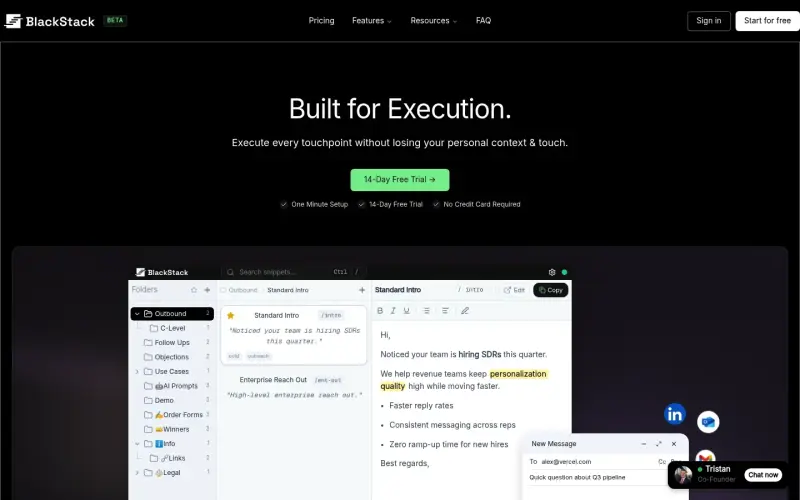
Save time and boost productivity with BlackStack, a tool that helps you organize and reuse your best snippets and message templates across all your tabs.
With BlackStack, you can stop wasting time rewriting the same messages and focus on what matters - executing your tasks efficiently and effectively, without losing your personal context and touch.
Details
Key Features
- Build a personal library of your best message templates, so you can reuse them instantly and save time on manual rewriting.
- Retrieve the right message quickly, without digging through old threads or emails, and surface your winning templates to deploy them every time.
- Deploy your messages instantly with one-click messaging, and stay in your flow by inserting formatted replies without breaking your stride.
- Enjoy a smoother onboarding process and faster syncing, so you can get started with BlackStack right away.
Best For
- Quality-focused teams who want to streamline their communication and messaging processes.
- Professionals who spend a lot of time writing and rewriting messages, and want to save time and boost productivity.
- Anyone who wants to improve their workflow and execute tasks more efficiently, without sacrificing personal touch and context.
Top Use Cases
- Automating routine messages and responses, so you can focus on high-priority tasks and activities.
- Streamlining your sales outreach and follow-up process, by using proven message templates that get results.
- Improving your customer support and service, by providing quick and personalized responses to common queries and issues.
Integrations
- BlackStack works seamlessly with your Chrome browser, so you can access your message templates and snippets from any tab or window.
Pros
- Saves time, boosts productivity, and helps you execute tasks more efficiently, while also providing a simple and intuitive interface.
Limitations
- May not be suitable for very large teams or enterprises that require custom solutions and support, and is currently only available as a Chrome extension.
Read full editorial notes
Key Features
- Build a personal library of your best message templates, so you can reuse them instantly and save time on manual rewriting.
- Retrieve the right message quickly, without digging through old threads or emails, and surface your winning templates to deploy them every time.
- Deploy your messages instantly with one-click messaging, and stay in your flow by inserting formatted replies without breaking your stride.
- Enjoy a smoother onboarding process and faster syncing, so you can get started with BlackStack right away.
- Benefit from a reviewed and refreshed Chrome extension UI, and a stable dashboard that's easy to use and navigate.
Ideal For
- Quality-focused teams who want to streamline their communication and messaging processes.
- Professionals who spend a lot of time writing and rewriting messages, and want to save time and boost productivity.
- Anyone who wants to improve their workflow and execute tasks more efficiently, without sacrificing personal touch and context.
Top Use Cases
- Automating routine messages and responses, so you can focus on high-priority tasks and activities.
- Streamlining your sales outreach and follow-up process, by using proven message templates that get results.
- Improving your customer support and service, by providing quick and personalized responses to common queries and issues.
Known Alternatives
- If you're using generic AI tools that lack personal context and touch, BlackStack is a more human-friendly alternative that helps you build meaningful relationships with your audience.
- Unlike other messaging tools that are cluttered and hard to use, BlackStack offers a simple and intuitive interface that makes it easy to find and deploy the right message.
Integrations & Ecosystem
- BlackStack works seamlessly with your Chrome browser, so you can access your message templates and snippets from any tab or window.
Pros & Cons
- Pros: Saves time, boosts productivity, and helps you execute tasks more efficiently, while also providing a simple and intuitive interface.
- Limitations: May not be suitable for very large teams or enterprises that require custom solutions and support, and is currently only available as a Chrome extension.
Keep researching BlackStack
Explore relevant products with a similar category, audience, or use case.



Resources
Social Profiles
Useful Links
FAQ about BlackStack
Concise answers based on the product's editorial information.
What is BlackStack and how does it work?
BlackStack is a tool that helps you organize and reuse your best snippets and message templates across all your tabs, so you can save time and boost productivity. It works by allowing you to build a personal library of your best message templates, and then retrieve and deploy them instantly with one-click messaging.
Is BlackStack easy to use and set up?
Yes, BlackStack is designed to be simple and intuitive, with a smooth onboarding process and fast syncing, so you can get started right away and start saving time and boosting productivity.
Launched
Ownership
If this is your product, contact us and we can help transfer it to you.
 ChatGPT,
 Claude,
 Perplexity,
 Gemini

