


- Use Cases
- Task Automation
- Pricing View
- One-time Payment
- Platforms
- MacOS
- Ideal For
- Designers Developers
Overview
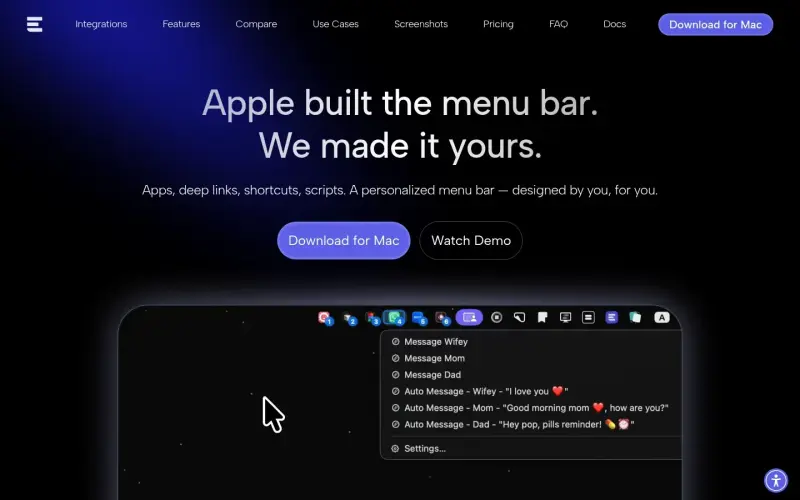
ExtraBar is a Mac menu bar manager designed to help users customize their workflow with shortcuts, quick actions, and deep links, all without requiring any permissions. It's ideal for individuals looking to personalize their menu bar to fit their specific needs and preferences.
With ExtraBar, users can break free from the static design of the traditional macOS menu bar and create a personalized space that reflects their unique workflow. By allowing users to add custom actions, deep links, and other shortcuts, ExtraBar provides a flexible and intuitive way to streamline tasks and improve productivity.
Details
Key Features
- Five display modes, including menu bar, floating bar, collapsed mode, notch mode, and hide/show launcher style, to accommodate different user preferences.
- Keyboard navigation, enabling users to call up ExtraBar and navigate menus using numbers or arrows for efficient task management.
- A fully customizable menu bar with 15 actions, including open with, run script, run shortcuts, hide/show, deep links, and keyboard shortcuts, to cater to diverse user needs.
- An included bookmark manager with cloud sync between devices and a web dashboard, providing a convenient way to access and manage bookmarks across multiple platforms.
Best For
- Power users who want to optimize their workflow and customize their menu bar to fit their specific needs and preferences.
- Professionals who rely on multiple apps and tools to perform their tasks need a streamlined way to access and manage them.
- Individuals who value flexibility and customization in their workflow and are looking for a menu bar manager that can adapt to their unique requirements.
Top Use Cases
- Creating custom shortcuts to frequently used apps, files, or folders saves time and improves productivity.
- Setting up deep links to specific features or sections within apps to streamline tasks and workflows.
- Organizing and managing bookmarks across multiple devices and platforms, using the included bookmark manager.
Integrations
- The available source material does not clearly specify integrations, but it mentions support for deep links, which suggests compatibility with apps that support this feature.
Pros
- Highly customizable
- supports deep links and scripts
- provides a range of display modes and keyboard navigation options
- includes a bookmark manager with cloud sync.
Read full editorial notes
What is ExtraBar?
ExtraBar is a fully customizable menu bar app that lets users design their ideal workflow with a range of actions, including deep links, shortcuts, and scripts. It integrates seamlessly with existing apps, enabling users to create a tailored menu bar tailored to their specific needs.
What are the key features of ExtraBar?
Five display modes, including menu bar, floating bar, collapsed mode, notch mode, and hide/show launcher style, to accommodate different user preferences.
Keyboard navigation, enabling users to call up ExtraBar and navigate menus using numbers or arrows for efficient task management.
A fully customizable menu bar with 15 actions, including open with, run script, run shortcuts, hide/show, deep links, and keyboard shortcuts, to cater to diverse user needs.
An included bookmark manager with cloud sync between devices and a web dashboard, providing a convenient way to access and manage bookmarks across multiple platforms.
Support for folders to keep the menu bar organized and clutter-free, ensuring that users can quickly find the actions they need.
Who is ExtraBar best for?
Power users who want to optimize their workflow and customize their menu bar to fit their specific needs and preferences.
Professionals who rely on multiple apps and tools to perform their tasks need a streamlined way to access and manage them.
Individuals who value flexibility and customization in their workflow and are looking for a menu bar manager that can adapt to their unique requirements.
What can you use ExtraBar for?
Creating custom shortcuts to frequently used apps, files, or folders saves time and improves productivity.
Setting up deep links to specific features or sections within apps to streamline tasks and workflows.
Organizing and managing bookmarks across multiple devices and platforms, using the included bookmark manager.
How does ExtraBar compare to alternatives?
Unlike traditional menu bar managers, ExtraBar takes a unique approach by providing a fully customizable replacement for the traditional menu bar, rather than just modifying or extending it.
Compared to other menu bar apps, ExtraBar offers a more comprehensive set of features and actions, including deep links, scripts, and shortcuts, to cater to a wide range of user needs.
What integrations and ecosystem support does ExtraBar offer?
The available source material does not clearly specify integrations, but it mentions support for deep links, which suggests compatibility with apps that support this feature.
What are the pros and limitations of ExtraBar?
Pros: Highly customizable; supports deep links and scripts; provides a range of display modes and keyboard navigation options; includes a bookmark manager with cloud sync.
Limitations: Not clearly stated in the available source material, but potential limitations may include a learning curve due to the high degree of customization or compatibility issues with certain apps or systems.
Built with
Keep researching ExtraBar
Explore relevant products with a similar category, audience, or use case.


Launched
Ownership
If this is your product, contact us and we can help transfer it to you.
 ChatGPT,
 Claude,
 Perplexity,
 Gemini

