


- Use Cases
- Wellbeing Relaxation
- Pricing
- Free
- Platforms
- MacOS
- Ideal For
- Students General Productivity
Overview
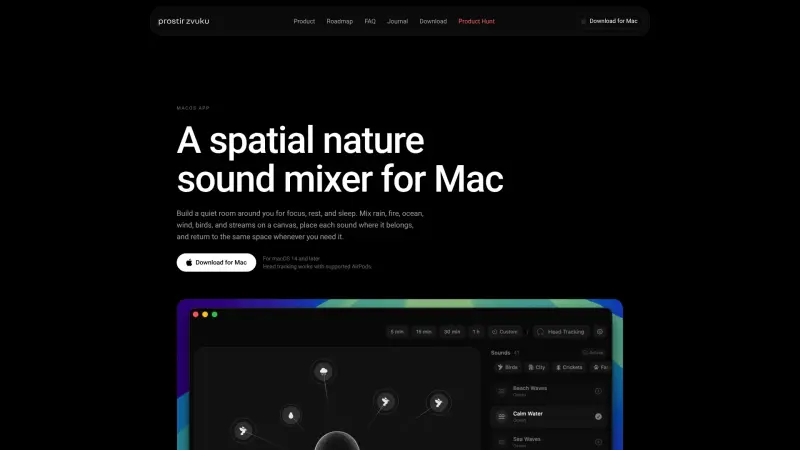
Prostir zvuku is a spatial nature sound mixer designed for Mac users, helping individuals create a peaceful environment for focus, rest, and sleep by mixing and placing various nature sounds in a virtual space.
By utilizing prostir zvuku, users can craft a personalized ambiance that fosters productivity and relaxation, with features such as head tracking and gentle endings that enhance the overall experience, making it an essential tool for those seeking to improve their work-life balance and mental well-being.
Details
Key Features
- Mix and place various nature sounds, such as rain, fire, ocean, wind, and birds, on a virtual canvas to create a personalized ambiance.
- Use head tracking with supported AirPods to anchor the sound environment, letting users move around while maintaining the immersive experience.
- Set timers for work sessions, resets, or sleep, with gentle endings that gradually quiet the scene instead of abruptly stopping the sounds.
- Access a full sound library, a spatial canvas, and head-tracking features in the free version, with an optional upgrade to Lifetime Pro for additional features.
Best For
- Individuals who struggle with focus and productivity in distracting environments can benefit from a personalized, immersive sound experience.
- People who have trouble sleeping or relaxing due to noise pollution or stress can utilize prostir zvuku to create a calming atmosphere.
- Users who value customization and control over their audio environment, and can appreciate the flexibility and features offered by prostir zvuku.
Top Use Cases
- Improving focus and productivity during work or study sessions by creating a personalized and immersive sound environment.
- Enhancing relaxation and sleep quality by crafting a calming atmosphere with soothing nature sounds.
- Creating a peaceful ambiance for meditation, yoga, or other mindfulness practices, with the option to customize and save different sound environments.
Integrations
- Prostir zvuku is available exclusively on the Mac App Store, and is compatible with macOS 14 and later, with support for spatial audio through any output, including Mac speakers, wired headphones, AirPods, or third-party Bluetooth headphones.
Pros
- Highly customizable, immersive sound environment
- unique head-tracking feature with supported AirPods
- gentle endings and timer options for a better user experience
- available for free with an optional upgrade to Lifetime Pro.
Limitations
- Requires macOS 14 or later
- head tracking feature requires supported AirPods
- limited to 3 simultaneous sound layers and a 5-minute timer in the free version.
Read full editorial notes
What is prostir zvuku?
Prostir zvuku is a macOS app that allows users to build a quiet room around themselves with a variety of nature sounds, including rain, fire, ocean, wind, and birds, which can be mixed and placed on a canvas to create a unique sound environment. The app is designed to help users focus, rest, and sleep better by offering a calming, immersive audio experience.
What are the key features of prostir zvuku?
Mix and place various nature sounds, such as rain, fire, ocean, wind, and birds, on a virtual canvas to create a personalized ambiance.
Use head tracking with supported AirPods to anchor the sound environment, letting users move around while maintaining the immersive experience.
Set timers for work sessions, resets, or sleep, with gentle endings that gradually quiet the scene instead of abruptly stopping the sounds.
Access a full sound library, a spatial canvas, and head-tracking features in the free version, with an optional upgrade to Lifetime Pro for additional features.
Control the app through the notch or menu bar, with options for up to 3 simultaneous sound layers and a 5-minute timer in the free version.
Who is prostir zvuku best for?
Individuals who struggle with focus and productivity in distracting environments can benefit from a personalized, immersive sound experience.
People who have trouble sleeping or relaxing due to noise pollution or stress can utilize prostir zvuku to create a calming atmosphere.
Users who value customization and control over their audio environment, and can appreciate the flexibility and features offered by prostir zvuku.
What can you use prostir zvuku for?
Improving focus and productivity during work or study sessions by creating a personalized and immersive sound environment.
Enhancing relaxation and sleep quality by crafting a calming atmosphere with soothing nature sounds.
Creating a peaceful ambiance for meditation, yoga, or other mindfulness practices, with the option to customize and save different sound environments.
How does prostir zvuku compare to alternatives?
Unlike other sound mixer apps, prostir zvuku offers a unique spatial audio experience with head tracking, allowing users to move around while maintaining the immersive environment.
Compared to traditional white noise machines or sound apps, prostir zvuku provides a more personalized and customizable experience, with a wide range of nature sounds and features to tailor the audio environment to individual needs.
What integrations and ecosystem support does prostir zvuku offer?
Prostir zvuku is available exclusively on the Mac App Store, and is compatible with macOS 14 and later, with support for spatial audio through any output, including Mac speakers, wired headphones, AirPods, or third-party Bluetooth headphones.
What are the pros and limitations of prostir zvuku?
Pros: Highly customizable, immersive sound environment; unique head-tracking feature with supported AirPods; gentle endings and timer options for a better user experience; available for free with an optional upgrade to Lifetime Pro.
Limitations: Requires macOS 14 or later; head tracking feature requires supported AirPods; limited to 3 simultaneous sound layers and a 5-minute timer in the free version.
Built with
Keep researching prostir zvuku
Explore relevant products with a similar category, audience, or use case.



Resources
Social Profiles
Useful Links
Launched
Ownership
If this is your product, contact us and we can help transfer it to you.
 ChatGPT,
 Claude,
 Perplexity,
 Gemini

