


Radian UI
Open source React components and Figma design system for production
- Use Cases
- Coding Website Building
- Pricing
- Free
- Ideal For
- Designers Developers
Overview
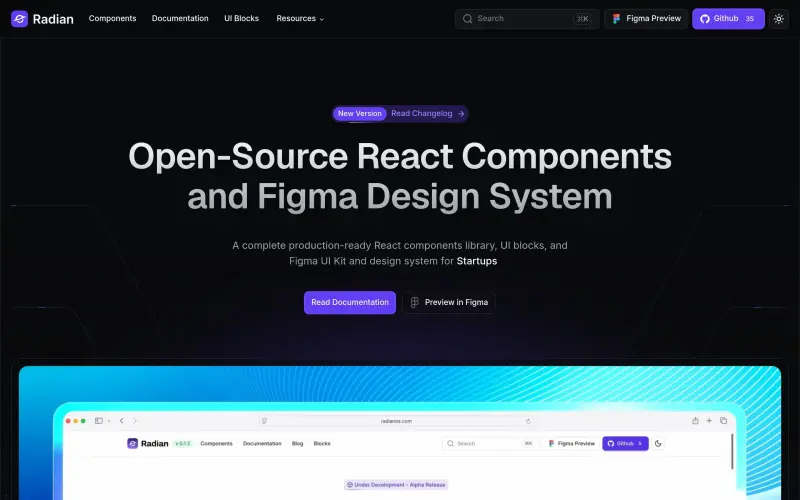
Building a new React application or refining an existing one often means juggling separate design tools and coding efforts. Radian UI streamlines this process, offering a complete open-source library of production-ready React components, UI blocks, and a Figma UI Kit. It’s designed for developers and designers to build polished, accessible interfaces faster and more consistently.
This integrated approach helps teams avoid common friction points between design and development. By providing a unified system that includes everything from fundamental design tokens to advanced, reusable UI blocks, Radian UI empowers you to ship high-quality products without compromising on flexibility or design integrity.
Details
Key Features
- Access a production-ready Figma UI Kit with over 2000 components and 1000 assets, all built with smart auto layout and Figma slots.
- Utilize a complete library of 50+ pre-styled React components, including Check Box, Input, Button, Table, and Dialog, built with Tailwind CSS.
- Achieve seamless design-to-code synchronization with variables and design tokens in Figma and code using the same semantic naming conventions.
- Customize colors, fonts, themes, and individual component properties to precisely match your brand's design system in minutes.
Best For
- Developers: Seeking production-ready, flexible React components to accelerate application development.
- Designers: Needing a comprehensive Figma UI Kit to create consistent and scalable designs.
- Startups: Aiming to build and ship polished products quickly with a unified design and development workflow.
- Agencies: Looking for a robust, customizable system to efficiently deliver high-quality web applications for clients.
Top Use Cases
- Rapidly prototyping new applications and features with pre-built UI components and blocks.
- Building complex user interfaces, including forms, navigation, data displays, and interactive elements like carousels and dialogs.
- Ensuring design consistency across your design files and live codebases using a shared design system.
- Customizing and branding user interfaces to align with specific company guidelines and themes.
Integrations
- Radian UI components are built for React applications and pre-styled with Tailwind CSS.
- The design system is fully implemented within Figma, utilizing features like Figma Variable System, Auto Layout, and Color Presets for design management.
Pros
- Open-source and production-ready
- comprehensive design-to-code synchronization
- highly customizable and flexible
- includes a vast library of both Figma and React components
Read full editorial notes
What is Radian UI?
Radian UI is an open-source design system and component library for React applications, packaged with a comprehensive Figma UI Kit. It provides all the necessary building blocks and design assets to efficiently create production-ready user interfaces.
What are the key features of Radian UI?
Access a production-ready Figma UI Kit with over 2000 components and 1000 assets, all built with smart auto layout and Figma slots.
Utilize a complete library of 50+ pre-styled React components, including Check Box, Input, Button, Table, and Dialog, built with Tailwind CSS.
Achieve seamless design-to-code synchronization with variables and design tokens in Figma and code using the same semantic naming conventions.
Customize colors, fonts, themes, and individual component properties to precisely match your brand's design system in minutes.
Benefit from a robust, composable system with minimal dependencies, simplified global CSS, and type-safe components.
Leverage a system built for the AI era, enabling AI coding assistants to easily build with Radian's components, blocks, and design foundations.
Who is Radian UI best for?
Developers: Seeking production-ready, flexible React components to accelerate application development.
Designers: Needing a comprehensive Figma UI Kit to create consistent and scalable designs.
Startups: Aiming to build and ship polished products quickly with a unified design and development workflow.
Agencies: Looking for a robust, customizable system to efficiently deliver high-quality web applications for clients.
What can you use Radian UI for?
Rapidly prototyping new applications and features with pre-built UI components and blocks.
Building complex user interfaces, including forms, navigation, data displays, and interactive elements like carousels and dialogs.
Ensuring design consistency across your design files and live codebases using a shared design system.
Customizing and branding user interfaces to align with specific company guidelines and themes.
Empowering design and development teams to collaborate more effectively by speaking the same design language.
How does Radian UI compare to alternatives?
Unlike starting a project with disparate design and development tools, Radian UI offers a unified Figma UI Kit and React component library, significantly reducing design-to-code friction and ensuring consistency from the outset.
Compared with building a design system from scratch, Radian UI provides a robust, production-ready foundation, saving countless hours on component development, accessibility testing, and design token management.
What integrations and ecosystem support does Radian UI offer?
Radian UI components are built for React applications and pre-styled with Tailwind CSS.
The design system is fully implemented within Figma, utilizing features like Figma Variable System, Auto Layout, and Color Presets for design management.
What are the pros of Radian UI?
Pros: Open-source and production-ready; comprehensive design-to-code synchronization; highly customizable and flexible; includes a vast library of both Figma and React components; built for accessibility.
Keep researching Radian UI
Explore relevant products with a similar category, audience, or use case.

Resources
Social Profiles
Useful Links
Launched
Ownership
If this is your product, contact us and we can help transfer it to you.
 ChatGPT,
 Claude,
 Perplexity,
 Gemini

