


ScanRelief
Automate receipt organization with OpenAI-powered renaming and Excel reporting
- Use Cases
- Document Data Extraction Task Automation
- Pricing View
- One-time Payment
- Ideal For
- Small Businesses
Overview
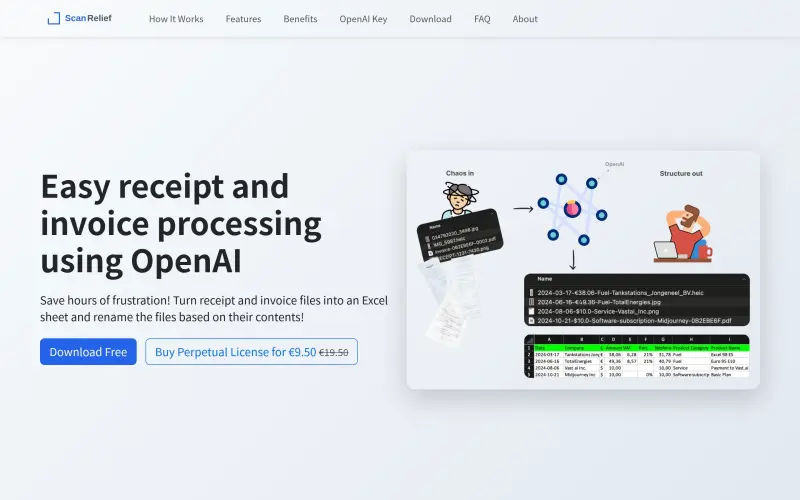
ScanRelief converts receipts to Excel and renames files for chronological sorting on Windows and Mac
It uses OpenAI to analyze receipt images and rename them based on key details like date, amount, and vendor
Details
Key Features
- Automated file renaming based on receipt details
- Excel report generation with key information
- Batch processing for multiple receipts at once
- Support for various image formats including JPEG, PNG, and HEIC
Best For
- Individuals and businesses looking to organize receipts for accounting or tax purposes
- Those who want to simplify receipt management without monthly subscription fees
- Users who need to process multiple receipts at once
Integrations
- OpenAI API
- Windows
- Mac OS
Pros
- Automates file renaming with key details like date and amount
- Creates a structured Excel report for easy receipt tracking
- Supports batch processing of multiple receipts
Limitations
- Requires an OpenAI API key for functionality
Read full editorial notes
What is ScanRelief?
ScanRelief is a tool that converts receipts to Excel and renames receipt-files into a useful format. It generates a detailed Excel report of all receipts, ordered by date.
What are the key features of ScanRelief?
- Automated file renaming based on receipt details
- Excel report generation with key information
- Batch processing for multiple receipts at once
- Support for various image formats including JPEG, PNG, and HEIC
Who is ScanRelief best for?
- Individuals and businesses looking to organize receipts for accounting or tax purposes
- Those who want to simplify receipt management without monthly subscription fees
- Users who need to process multiple receipts at once
What integrations and ecosystem support does ScanRelief offer?
- OpenAI API
- Windows
- Mac OS
What are the pros and limitations of ScanRelief?
- Pros: Automates file renaming with key details like date and amount; Creates a structured Excel report for easy receipt tracking; Supports batch processing of multiple receipts
- Limitations: Requires an OpenAI API key for functionality
Built with
Keep researching ScanRelief
Explore relevant products with a similar category, audience, or use case.



Resources
Social Profiles
FAQ about ScanRelief
Concise answers based on the product's editorial information.
What file formats are supported by ScanRelief?
ScanRelief supports various formats, including JPEG, PNG, HEIC, and PDF
How much does ScanRelief cost to use?
ScanRelief uses a pay-per-use model for OpenAI, costing about 50ct per 100 receipts
Launched
Ownership
If this is your product, contact us and we can help transfer it to you.
 ChatGPT,
 Claude,
 Perplexity,
 Gemini

