


The Cook
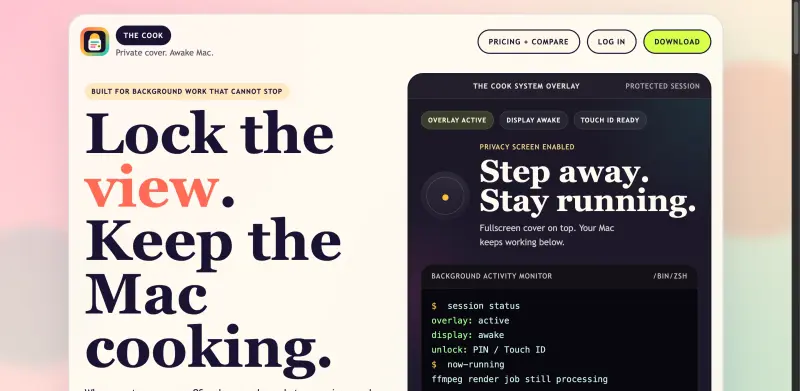
Stay focused and secure with The Cook, keeping your screen awake and tasks running privately in the background.
- Use Cases
- Not listed yet
- Pricing View
- One-time Payment
- Platforms
- Not listed yet
- Ideal For
- Developers General Productivity
Overview
Stay Productive While Maintaining Privacy: The Ultimate Mac Overlay Solution
The Cook solves a common dilemma faced by Mac users who need to step away from their desk without interrupting ongoing tasks, providing a private fullscreen overlay that keeps your Mac awake and productive.
Details
Key Features
- Enhanced productivity through a private and secure fullscreen overlay, protecting your work from exposure in shared spaces.
- Seamless screen wake functionality, ensuring your Mac remains active even when you're not at your desk, perfect for long-running tasks or downloads.
- Advanced security with PIN or Touch ID unlock, offering fast and secure access to your Mac while keeping others out.
- Customization options with 13 built-in themes and the ability to load any HTTPS page as your lock screen, providing a personalized experience.
Best For
- Developers who need to run continuous integration tasks or compilations without interruption.
- Designers working on sensitive projects that require privacy and security.
- Power users managing multiple tasks simultaneously and needing a secure way to step away without halting progress.
Top Use Cases
- Securely running overnight downloads or updates without the risk of interruption or exposure.
- Maintaining privacy during shared workspace hours, ensuring your screen and ongoing tasks are protected.
- Enhancing focus and reducing distractions by utilizing the custom overlay as a motivational tool or dashboard for important information.
Integrations
- Seamless integration with macOS, including support for Apple Silicon and Intel processors, ensuring compatibility across various Mac models.
Pros
- Offers enhanced privacy and security, is easy to use, and provides customization options for a personalized experience.
Limitations
- May not be suitable for users requiring advanced, enterprise-level security features or custom solutions beyond its current capabilities.
Read full editorial notes
Key Features
- Enhanced productivity through a private and secure fullscreen overlay, protecting your work from exposure in shared spaces.
- Seamless screen wake functionality, ensuring your Mac remains active even when you're not at your desk, perfect for long-running tasks or downloads.
- Advanced security with PIN or Touch ID unlock, offering fast and secure access to your Mac while keeping others out.
- Customization options with 13 built-in themes and the ability to load any HTTPS page as your lock screen, providing a personalized experience.
- Streamlined workflow integration with features like AI agent ticker, schedule & auto-lock, and global hotkey, designed to minimize distractions and maximize efficiency.
Ideal For
- Developers who need to run continuous integration tasks or compilations without interruption.
- Designers working on sensitive projects that require privacy and security.
- Power users managing multiple tasks simultaneously and needing a secure way to step away without halting progress.
Top Use Cases
- Securely running overnight downloads or updates without the risk of interruption or exposure.
- Maintaining privacy during shared workspace hours, ensuring your screen and ongoing tasks are protected.
- Enhancing focus and reducing distractions by utilizing the custom overlay as a motivational tool or dashboard for important information.
Known Alternatives
- A more secure and feature-rich alternative to using the Mac's built-in screen saver or lock function, providing additional layers of privacy and productivity.
- A lightweight solution compared to full-fledged security software, focusing on simplicity and ease of use for everyday Mac users.
Integrations & Ecosystem
- Seamless integration with macOS, including support for Apple Silicon and Intel processors, ensuring compatibility across various Mac models.
Pros & Cons
- Pros: Offers enhanced privacy and security, is easy to use, and provides customization options for a personalized experience.
- Limitations: May not be suitable for users requiring advanced, enterprise-level security features or custom solutions beyond its current capabilities.
Keep researching The Cook
Explore relevant products with a similar category, audience, or use case.



FAQ about The Cook
Concise answers based on the product's editorial information.
Is The Cook compatible with the latest Mac models and operating systems?
Yes, The Cook is designed to work with all Mac models from 2018 onwards and is compatible with macOS 14+.
Can I customize the appearance of the overlay to fit my preferences?
Yes, The Cook offers 13 built-in themes and allows you to load any HTTPS page as your lock screen, providing a high degree of customization.
Launched
Ownership
If this is your product, contact us and we can help transfer it to you.
 ChatGPT,
 Claude,
 Perplexity,
 Gemini

