


Trello
Streamline your workflow and boost productivity by capturing, organizing, and tackling to-dos from a single, intuitive platform
- Use Cases
- Not listed yet
- Pricing View
- Subscription
- Platforms
- Not listed yet
- Ideal For
- Project Managers Remote Teams
Overview
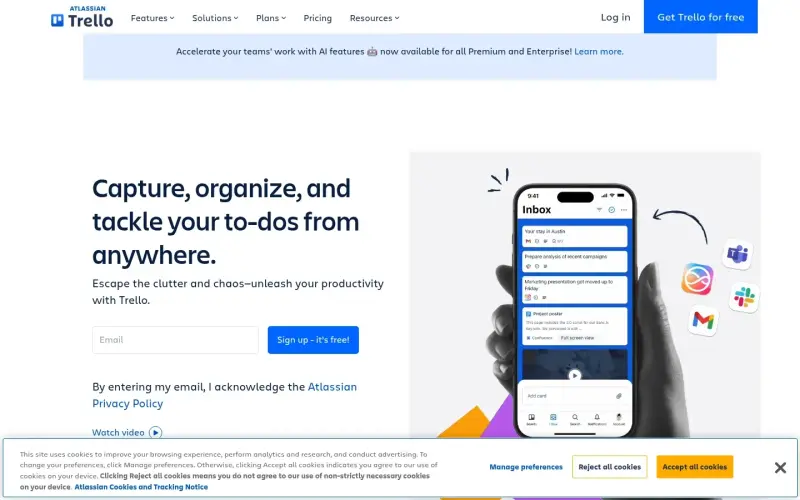
Capture, organize, and tackle your to-dos from anywhere with Trello, the ultimate tool to boost your productivity.
Imagine having all your tasks, ideas, and responsibilities in one place, easily accessible from anywhere, and being able to turn them into actionable to-dos with just a few clicks - that's what Trello offers, helping you escape the clutter and chaos of everyday work.
Details
Key Features
- Streamline your workflow with Inbox, Boards, and Planner, keeping you organized and focused on what matters most.
- Turn emails and messages into to-dos effortlessly with features like EMAIL MAGIC and MESSAGE APP SORCERY.
- Customize your workflow with easy integrations, automation, and card mirroring to fit your unique needs.
- Get more done with AI-powered features now available for all Premium and Enterprise users.
Best For
- Individuals looking to boost their personal productivity and stay on top of their tasks and projects.
- Small to medium-sized teams seeking a collaborative tool to manage their work and communication.
- Businesses aiming to improve team efficiency, communication, and overall productivity.
Top Use Cases
- Managing multiple projects simultaneously and keeping track of deadlines and tasks.
- Collaborating with team members on a single platform, reducing email clutter and miscommunication.
- Turning daily tasks and ideas into actionable to-dos and tracking progress over time.
Integrations
- Integrates seamlessly with a wide range of apps and services, including Slack, Google Drive, and Microsoft Teams, to enhance your workflow.
Pros
- Easy to use, highly customizable, and offers a free version with robust features.
Limitations
- May not be ideal for very large or complex enterprises requiring highly customized solutions, and the mobile app can be somewhat limited compared to the web version.
Read full editorial notes
Key Features
- Streamline your workflow with Inbox, Boards, and Planner, keeping you organized and focused on what matters most.
- Turn emails and messages into to-dos effortlessly with features like EMAIL MAGIC and MESSAGE APP SORCERY.
- Customize your workflow with easy integrations, automation, and card mirroring to fit your unique needs.
- Get more done with AI-powered features now available for all Premium and Enterprise users.
- Join a community of millions of users globally who have already seen the benefits of using Trello, with 75% of organizations reporting value within 30 days.
Ideal For
- Individuals looking to boost their personal productivity and stay on top of their tasks and projects.
- Small to medium-sized teams seeking a collaborative tool to manage their work and communication.
- Businesses aiming to improve team efficiency, communication, and overall productivity.
Top Use Cases
- Managing multiple projects simultaneously and keeping track of deadlines and tasks.
- Collaborating with team members on a single platform, reducing email clutter and miscommunication.
- Turning daily tasks and ideas into actionable to-dos and tracking progress over time.
Known Alternatives
- Asana, but Trello offers a more visual approach to task management with its board-based system.
- Jira, but Trello is generally easier to use and more adaptable to various team sizes and workflows.
Integrations & Ecosystem
- Integrates seamlessly with a wide range of apps and services, including Slack, Google Drive, and Microsoft Teams, to enhance your workflow.
Pros & Cons
- Pros: Easy to use, highly customizable, and offers a free version with robust features.
- Limitations: May not be ideal for very large or complex enterprises requiring highly customized solutions, and the mobile app can be somewhat limited compared to the web version.
Keep researching Trello
Explore relevant products with a similar category, audience, or use case.



Resources
Social Profiles
FAQ about Trello
Concise answers based on the product's editorial information.
Is Trello suitable for personal use?
Yes, Trello is great for personal use, helping you organize your tasks, ideas, and projects in a visually appealing and easy-to-use way.
Can I use Trello for free?
Yes, Trello offers a free version with many features, making it accessible to individuals and small teams who want to try it out or use it for simple projects.
Launched
Ownership
If this is your product, contact us and we can help transfer it to you.
 ChatGPT,
 Claude,
 Perplexity,
 Gemini

