


- Use Cases
- Lead Generation Content Optimization
- Pricing
- Subscription
- Platforms
- Browser Chrome Extension
- Ideal For
- Sales Teams SDRs / BDRs
Overview
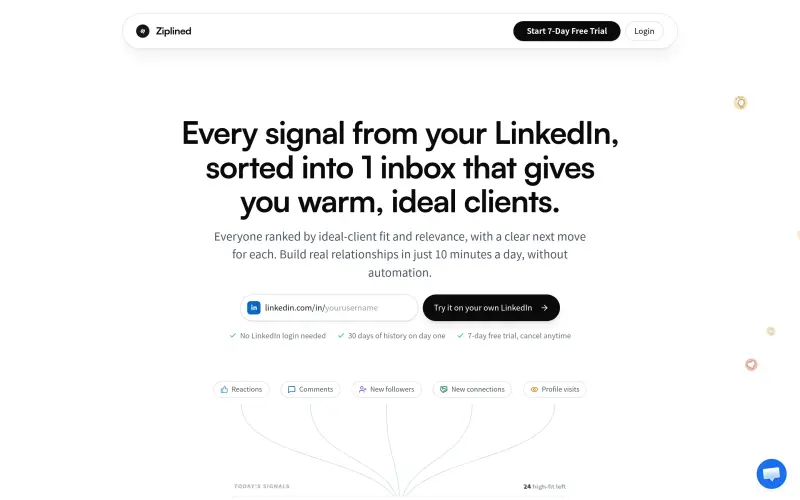
Ziplined transforms your LinkedIn activity into a clear, actionable inbox, helping professionals identify their warmest, most relevant leads. It sorts every signal from your network, ensuring you quickly see who matches your ideal client profile, who's most engaged, and exactly what to do next to build meaningful relationships, all without any automation.
This tool cuts through the overwhelm of LinkedIn, focusing your attention on the individuals who genuinely fit your criteria and are actively showing interest. By ranking engagements based on your ideal client and their interaction quality, Ziplined ensures you spend your time connecting with the right people, every morning, in just a few minutes.
Details
Key Features
- Curated Client Inbox: Consolidates all LinkedIn reactions, comments, new followers, new connections, and profile visits into one prioritized list.
- Ideal Client Profile (ICP) Matching: Ranks every engagement against your predefined ideal client criteria, such as job title, seniority, industry, company size, and country.
- Engagement Prioritization: Scores interactions based on quality (e.g., a thoughtful comment outranks a simple like) and frequency, ensuring the most promising leads rise to the top.
- Catch Silent Signals: Surfaces overlooked opportunities like new followers, new connections, and profile visits, which might otherwise go unnoticed.
Best For
- Professionals who use LinkedIn for lead generation but struggle with the sheer volume of notifications and noise.
- Salespeople, founders, and consultants focused on building authentic relationships with specific ideal clients.
- Content creators looking to identify and engage with their most interested and high-value audience members.
Top Use Cases
- Quickly identify warm leads and potential clients from your daily LinkedIn activity.
- Prioritize outreach by focusing on those who fit your ideal client profile and have shown the most interest.
- Build genuine relationships by responding to specific engagements with context-rich messages.
- Save significant time typically spent sifting through profiles and activity feeds on LinkedIn.
Integrations
- The available source material does not clearly specify integrations beyond its core function with LinkedIn. It offers an optional Chrome extension to catch silent signals like profile visits, new followers, and new connections.
Pros
- Streamlines lead generation from LinkedIn by prioritizing ideal clients
- saves significant time by centralizing and ranking interactions
- maintains human authenticity with no automated sending
- provides 30 days of historical data from day one.
Read full editorial notes
What is Ziplined?
Ziplined is a dedicated inbox that organizes all engagement signals from your LinkedIn profile. It helps you quickly identify and connect with warm, ideal clients by filtering and ranking them based on your specific criteria.
What are the key features of Ziplined?
Curated Client Inbox: Consolidates all LinkedIn reactions, comments, new followers, new connections, and profile visits into one prioritized list.
Ideal Client Profile (ICP) Matching: Ranks every engagement against your predefined ideal client criteria, such as job title, seniority, industry, company size, and country.
Engagement Prioritization: Scores interactions based on quality (e.g., a thoughtful comment outranks a simple like) and frequency, ensuring the most promising leads rise to the top.
Catch Silent Signals: Surfaces overlooked opportunities like new followers, new connections, and profile visits, which might otherwise go unnoticed.
Actionable Next Steps: Provides a clear path with "three moves" for each lead: open their LinkedIn profile, add them to a watchlist, or use a pre-drafted message based on their activity.
Historical Data & Ongoing Sync: Instantly provides 30 days of past activity and continuously updates with new engagements daily without needing your LinkedIn login.
Who is Ziplined best for?
Professionals who use LinkedIn for lead generation but struggle with the sheer volume of notifications and noise.
Salespeople, founders, and consultants focused on building authentic relationships with specific ideal clients.
Content creators looking to identify and engage with their most interested and high-value audience members.
What can you use Ziplined for?
Quickly identify warm leads and potential clients from your daily LinkedIn activity.
Prioritize outreach by focusing on those who fit your ideal client profile and have shown the most interest.
Build genuine relationships by responding to specific engagements with context-rich messages.
Save significant time typically spent sifting through profiles and activity feeds on LinkedIn.
Never miss a valuable connection or interaction, even from "quiet signals" like profile visits.
How does Ziplined compare to alternatives?
Manual LinkedIn Browsing: Ziplined eliminates the need to manually click through countless profiles and notifications, instead delivering pre-sorted, ranked, and actionable leads directly to an inbox.
Automated Outreach Tools: Unlike tools that send automated messages, Ziplined is "never automated" and provides drafted messages for *your review and send*, preserving genuine human connection and control.
What integrations and ecosystem support does Ziplined offer?
The available source material does not clearly specify integrations beyond its core function with LinkedIn. It offers an optional Chrome extension to catch silent signals like profile visits, new followers, and new connections.
What are the pros of Ziplined?
Pros: Streamlines lead generation from LinkedIn by prioritizing ideal clients; saves significant time by centralizing and ranking interactions; maintains human authenticity with no automated sending; provides 30 days of historical data from day one.
Built with
Keep researching Ziplined
Explore relevant products with a similar category, audience, or use case.



Resources
Social Profiles
Launched
Ownership
If this is your product, contact us and we can help transfer it to you.
 ChatGPT,
 Claude,
 Perplexity,
 Gemini

