

A
AI Video Watermark Remover
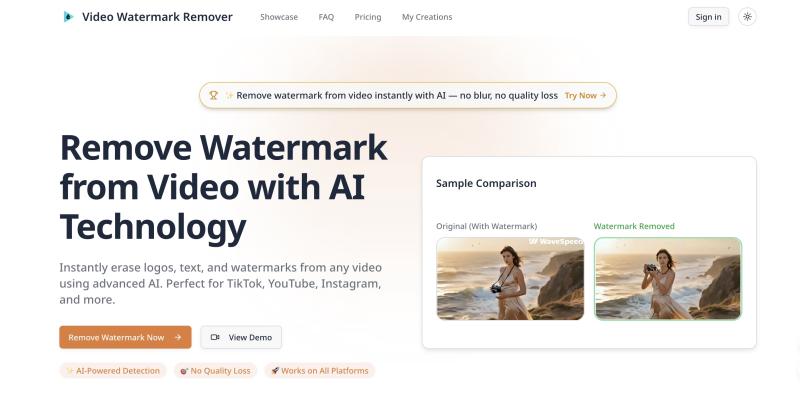
Remove watermark from video instantly with AI technology. Erase logos, text, and watermarks from TikTok, YouTube, Instagram videos without blur or quality loss.
162 website clicks
Launch week 5, 2026
- Use Cases
- Not listed yet
- Pricing
- Subscription
- Platforms
- Not listed yet
- Ideal For
- Content Creators Creatives
Overview
Video Watermark Remover is an AI-powered online tool that removes logos, text overlays, timestamps, and branding elements from video content without degrading quality or introducing visible blur. Content creators and marketers repurposing clips across multiple platforms can quickly clean footage by selecting unwanted watermarks with an intuitive brush interface, while advanced algorithms reconstruct underlying backgrounds frame by frame. The tool handles static and dynamic watermarks on TikTok videos, YouTube content, stock footage, and user-generated material with intelligent motion tracking that maintains 4K and 1080p resolution throughout processing. Unlike traditional cropping methods that sacrifice composition, this browser-based solution analyzes surrounding pixels to seamlessly fill removed areas with contextually appropriate textures and colors. Trusted by thousands of creators who process everything from tutorial videos to marketing campaigns, the platform operates entirely online with automatic file deletion after processing to ensure privacy. Users can preview results before downloading, batch-process multiple clips simultaneously, and handle various formats, from MP4 to MOV, without installing software or learning complex editing techniques.
Key Features
Details
AI-Powered Intelligent Detection: Advanced computer vision algorithms automatically identify watermark boundaries, text overlays, and logo placement across video frames, then reconstruct hidden backgrounds by analyzing motion patterns and surrounding pixel information for seamless removal.
Background Reconstruction Technology: Rather than blurring or cropping footage, the system intelligently fills in watermark areas by analyzing adjacent frames and matching textures, colors, and movement patterns to restore original content while preserving full HD or 4K resolution.
Dynamic Watermark Tracking: Smart tracking technology follows moving or animated watermarks throughout video timelines, adapting removal techniques frame by frame to handle bouncing TikTok logos, scrolling text, and position-shifting branding elements without manual adjustment.
Multi-Format Video Support: Process files in MP4, MOV, AVI, 3GP, and additional formats directly through your browser without conversion steps, supporting everything from smartphone recordings to professional camera footage with maintained codec integrity.
Batch Processing Capabilities: Upload and clean multiple videos simultaneously for efficient workflow management, ideal for agencies handling client content, marketers updating campaign assets, or creators repurposing content libraries across different platforms at scale.
Zero-Installation Browser Tool: Access full functionality through any modern web browser on desktop, mobile, or tablet devices without downloading applications, consuming device storage, or dealing with software compatibility issues across operating systems.
Secure Processing Pipeline: Uploaded videos are encrypted during processing and automatically deleted from servers within 24 hours, ensuring privacy for sensitive business materials, unreleased footage, or personal recordings without the risks of permanent cloud storage.
Who This Is For
Perfect for content creators and social media managers who repurpose videos across TikTok, Instagram, YouTube, and other platforms, needing to remove platform-specific watermarks while maintaining professional presentation standards and original video quality.
Ideal for marketing teams and agencies updating branded video assets when logos change or repurposing client footage for different campaigns, eliminating the need for expensive reshoots or complicated editing workflows that delay project timelines.
Designed for educators, tutorial creators, and online instructors who compile clips from various sources into educational content, requiring clean footage without distracting watermarks that pull viewer attention from instructional material.
Common Questions
Will removing watermarks affect my video quality or cause visible blur?
Modern AI watermark removers maintain original resolution by intelligently reconstructing background content rather than applying blur filters. The technology analyzes surrounding frames to fill removed areas with contextually appropriate pixels, preserving 4K and 1080p quality without compression artifacts or noticeable editing marks.
Can the tool handle moving watermarks like TikTok's bouncing logo?
Yes, advanced motion tracking algorithms follow dynamic watermarks throughout the entire video timeline, adapting removal techniques frame by frame. Whether dealing with stationary corner logos or animated elements that change position, the system processes each frame individually while maintaining temporal consistency across transitions.
How long does the watermark removal process typically take?
Processing time depends on video length, resolution, and watermark complexity, but most clips under two minutes complete within 30 to 90 seconds. Longer videos or those with multiple watermarks may take several minutes, though batch processing lets you queue multiple files simultaneously for an efficient workflow.
Is it legal to remove watermarks from videos I find online?
Legality depends entirely on content ownership and licensing terms. Removing watermarks from your own original content or properly licensed footage is acceptable, but stripping watermarks from copyrighted material you don't have rights to violates intellectual property laws and platform terms of service, potentially resulting in legal consequences or account suspension.
Built with
Keep researching AI Video Watermark Remover
Explore relevant products with a similar category, audience, or use case.



Submitted by

Frances Starken
 ChatGPT,
 Claude,
 Perplexity,
 Gemini

