

- Use Cases
- Virtual camera management
- Pricing View
- Subscription
- Ideal For
- Entrepreneurs Remote Teams
Overview
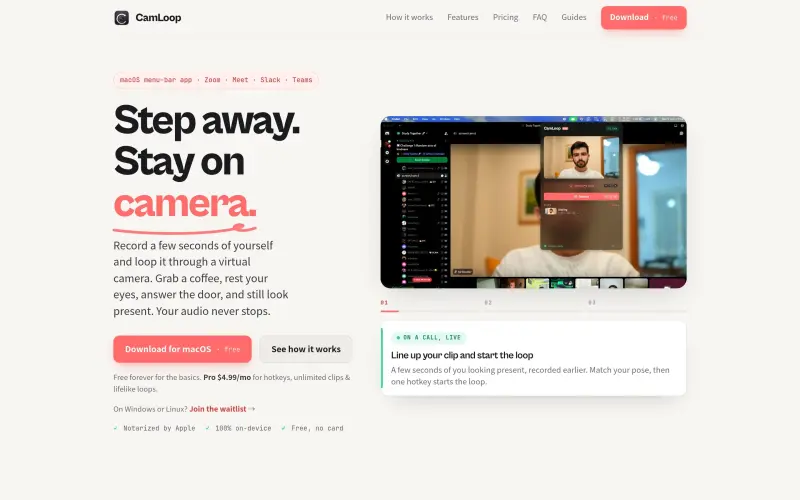
Camloop is a tool that helps individuals who spend a lot of time on video calls, such as those on Zoom, Meet, Slack, and Teams, to step away from their camera while still appearing present. It does this by recording a few seconds of the user and looping it through a virtual camera.
For people who live on camera, Camloop provides a convenient way to take a break without interrupting the flow of a meeting. It works by recording a short clip of the user, which is then played on a loop, allowing them to step away from their camera while still appearing engaged. The real audio still passes through, ensuring the user can continue participating in the meeting without interruption.
Details
Key Features
- Records a short clip of the user, which is then played on a loop, allowing them to step away from their camera while still appearing engaged.
- Allows for customizable shortcuts, making it easy to switch between the live camera and the looped clip.
- Includes a "simulated lag" feature, which makes the looped clip appear like a normal video feed with occasional freezes and stutters.
- Enables the user to import an existing video instead of recording a new one.
Best For
- Remote workers who spend a lot of time on video calls and need to take breaks without interrupting the meeting.
- Professionals who need to attend multiple meetings in a row and want to be able to step away from their camera without appearing absent.
- Individuals who live on camera, such as online teachers, coaches, or consultants, and need a way to take breaks without interrupting their sessions.
Top Use Cases
- Taking a break during a long meeting without appearing absent.
- Stepping away from the camera to grab a snack or drink without interrupting the meeting.
- Creating a buffer between back-to-back meetings, allowing the user to collect their thoughts before the next meeting starts.
Integrations
- Camloop integrates with popular video conferencing platforms, including Zoom, Google Meet, Slack, and Microsoft Teams, as well as any app with a camera picker.
Pros
- Convenient and easy to use
- provides a seamless experience for the user and the other meeting attendees
- allows for customizable shortcuts.
Read full editorial notes
What is Camloop?
Camloop is a software that records a few seconds of the user and loops it through a virtual camera, allowing them to step away from their camera while still appearing present. It integrates with popular video conferencing platforms, making it easy to use in a variety of settings.
What are the key features of Camloop?
Records a short clip of the user, which is then played on a loop, allowing them to step away from their camera while still appearing engaged.
Allows for customizable shortcuts, making it easy to switch between the live camera and the looped clip.
Includes a "simulated lag" feature, which makes the looped clip appear like a normal video feed with occasional freezes and stutters.
Enables the user to import an existing video instead of recording a new one.
Provides a ghost-frame alignment feature, which helps the user line up the start of the looped clip with the live feed.
Who is Camloop best for?
Remote workers who spend a lot of time on video calls and need to take breaks without interrupting the meeting.
Professionals who need to attend multiple meetings in a row and want to be able to step away from their camera without appearing absent.
Individuals who live on camera, such as online teachers, coaches, or consultants, and need a way to take breaks without interrupting their sessions.
What can you use Camloop for?
Taking a break during a long meeting without appearing absent.
Stepping away from the camera to grab a snack or drink without interrupting the meeting.
Creating a buffer between back-to-back meetings, allowing the user to collect their thoughts before the next meeting starts.
How does Camloop compare to alternatives?
Unlike other screen-sharing tools, Camloop is specifically designed for video conferencing and provides a more seamless experience for the user and the other meeting attendees.
Compared to manually pausing or leaving a meeting, Camloop provides a more convenient and less disruptive way to take a break.
What integrations and ecosystem support does Camloop offer?
Camloop integrates with popular video conferencing platforms, including Zoom, Google Meet, Slack, and Microsoft Teams, as well as any app with a camera picker.
What are the pros of Camloop?
Pros: Convenient and easy to use; provides a seamless experience for the user and the other meeting attendees; allows for customizable shortcuts.
Built with
Keep researching Camloop
Explore relevant products with a similar category, audience, or use case.



Launched
Ownership
If this is your product, contact us and we can help transfer it to you.
 ChatGPT,
 Claude,
 Perplexity,
 Gemini

