


- Use Cases
- Video Editing
- Pricing View
- One-time Payment
- Ideal For
- Content Creators Educators
Overview
Dina is a macOS screen recorder designed to help users create engaging demos, tutorials, courses, and social media videos with ease. It's perfect for individuals and professionals looking to produce high-quality video content without extensive video editing experience.
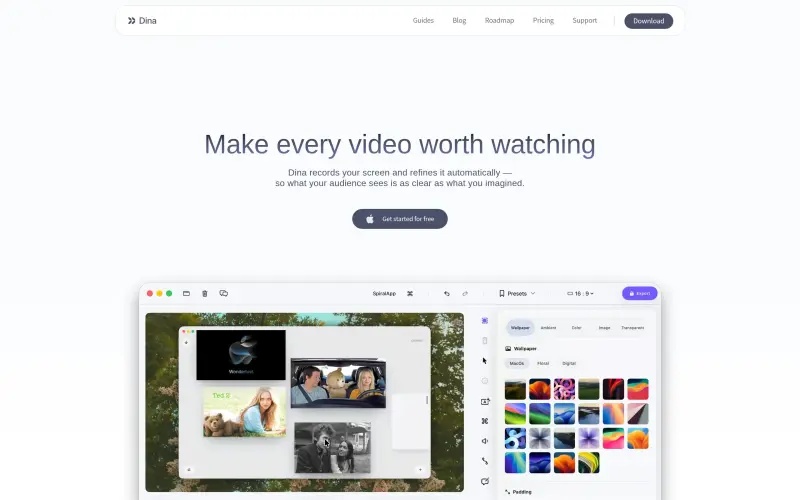
Dina streamlines the video creation process by automatically refining screen recordings, allowing users to focus on the content rather than the technical aspects of video production. With features like automatic zoom, smooth cursor movement, and cinematic effects, Dina helps users create polished videos that capture their audience's attention.
Details
Key Features
- Automatic zoom that helps your audience stay focused on key interactions
- Smooth cursor movements that make motion feel steady and intentional
- Customizable layouts, including backgrounds, cursor effects, and camera settings, to make every frame feel intentional
- Editable captions and voiceovers that allow for precise control over narration and transcript
Best For
- Professionals creating demo videos, tutorials, or online courses
- Content creators looking to produce high-quality social media videos
- Individuals who want to create engaging video content without extensive video editing experience
Top Use Cases
- Creating demo videos to showcase products or services
- Producing tutorial videos to teach others a new skill
- Developing online courses to educate students or professionals
Integrations
- The available source material does not clearly specify integrations, but Dina is built for macOS and utilizes Metal, SwiftUI, and Core ML for optimized performance
Pros
- easy to use
- produces high-quality video content
- customizable layouts and captions
Read full editorial notes
What is Dina?
Dina is a screen recording tool that captures everything on your screen, including audio, camera, cursor, and keystrokes, and refines it automatically to create clear and engaging videos. It's built to integrate into your workflow, making it easy to create beautiful videos from your screen recordings.
What are the key features of Dina?
Automatic zoom that helps your audience stay focused on key interactions
Smooth cursor movements that make motion feel steady and intentional
Customizable layouts, including backgrounds, cursor effects, and camera settings, to make every frame feel intentional
Editable captions and voiceovers that allow for precise control over narration and transcript
AI-powered transcript editing and voiceovers that turn speech into edits and text into natural-sounding narration
Who is Dina best for?
Professionals creating demo videos, tutorials, or online courses
Content creators looking to produce high-quality social media videos
Individuals who want to create engaging video content without extensive video editing experience
What can you use Dina for?
Creating demo videos to showcase products or services
Producing tutorial videos to teach others a new skill
Developing online courses to educate students or professionals
How does Dina compare to alternatives?
Dina's automatic zoom and smooth cursor movements set it apart from other screen recording tools that require manual editing
Dina's customizable layouts and editable captions provide more control over the final video product compared to other screen recorders
What integrations and ecosystem support does Dina offer?
The available source material does not clearly specify integrations, but Dina is built for macOS and utilizes Metal, SwiftUI, and Core ML for optimized performance
What are the pros and limitations of Dina?
Pros: easy to use; produces high-quality video content; customizable layouts and captions
Limitations: Not clearly stated in the available source material, but potential limitations may include limited compatibility with other operating systems or specific technical requirements for optimal performance
Keep researching Dina
Explore relevant products with a similar category, audience, or use case.



Resources
Social Profiles
Launched
Ownership
If this is your product, contact us and we can help transfer it to you.
 ChatGPT,
 Claude,
 Perplexity,
 Gemini

