


Display.dev
Agent-neutral publishing for your AI agent's work
- Use Cases
- LLM Developer Tool Feedback Tool
- Pricing View
- Subscription
- Ideal For
- Developers Engineering Teams
Overview
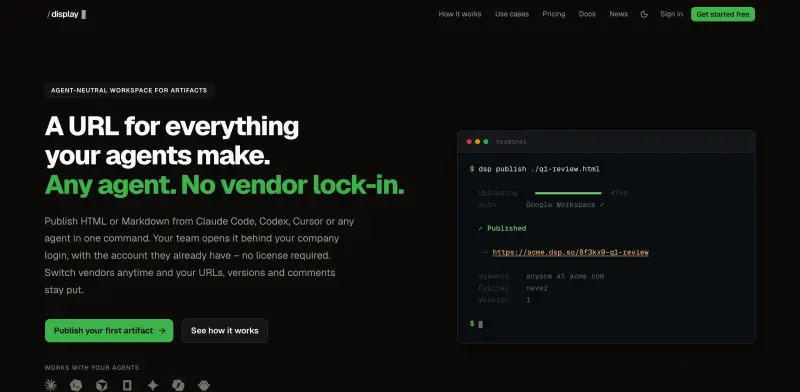
Display.dev offers a unique workspace for sharing, reviewing, and iterating on artifacts created by AI agents. It provides a permanent, secure URL for everything your agents make, from HTML reports to Markdown docs. Designed for teams collaborating on agent-generated content, it eliminates vendor lock-in and simplifies team access, ensuring your work remains accessible and actionable, regardless of which agent you use.
Instead of juggling files in chat or dealing with screenshots of dynamic content, Display.dev allows your agent to publish directly to a dedicated URL. Your team can access this link behind your company's existing login, add inline comments, and your agent can then act on that feedback to publish updates, transforming static outputs into living, collaborative documents.
Details
Key Features
- Agent-neutral publishing: Publish HTML or Markdown from any agent (Claude Code, Codex, Cursor, etc.), ensuring your content is never tied to a specific tool.
- Secure team access: Your team views artifacts behind your company's existing Google or Microsoft login, eliminating per-vendor seats and additional accounts.
- Persistent URLs and versioning: Switch agents anytime, and your artifact URLs, complete version history, and comments remain fully intact.
- Interactive commenting: Teammates can leave inline comments on artifacts, which your agent can then read and act on for updates.
Best For
- Teams that regularly generate and share HTML reports, Markdown documents, or other artifacts using AI agents.
- Companies seeking to streamline collaboration on agent-produced content while maintaining strict internal access controls.
- Organizations looking to avoid vendor lock-in for their AI agent workflows and ensure long-term access to their generated outputs.
Top Use Cases
- Publishing dynamic Q1 revenue reviews or market analysis reports generated by Claude Code, ensuring charts remain interactive and accessible.
- Sharing agent-drafted marketing copy or technical documentation with your team for collaborative review and inline feedback, then having the agent implement changes.
- Creating a secure, version-controlled repository for all artifacts produced by various agents, making them discoverable and auditable within your organization.
Integrations
- Display.dev integrates with major company Single Sign-On (SSO) providers like Google Workspace and Microsoft for secure team authentication. It supports publishing from various AI agents (e.g., Claude Code, Codex, Cursor) via CLI, MCP, or a single API call, fitting into existing agent workflows.
Pros
- Agent-neutral publishing with no vendor lock-in
- unlimited viewers behind company SSO at one flat price
- robust versioning and inline commenting capabilities.
Read full editorial notes
What is Display.dev?
Display.dev is a workspace that provides a unique, permanent URL for every artifact your AI agents produce. It enables your team to securely view, comment on, and iterate on these agent-generated outputs without needing extra accounts or worrying about vendor compatibility.
What are the key features of Display.dev?
Agent-neutral publishing: Publish HTML or Markdown from any agent (Claude Code, Codex, Cursor, etc.), ensuring your content is never tied to a specific tool.
Secure team access: Your team views artifacts behind your company's existing Google or Microsoft login, eliminating per-vendor seats and additional accounts.
Persistent URLs and versioning: Switch agents anytime, and your artifact URLs, complete version history, and comments remain fully intact.
Interactive commenting: Teammates can leave inline comments on artifacts, which your agent can then read and act on for updates.
Unlimited viewers: Share with any number of colleagues at your company without incurring additional per-user costs.
Who is Display.dev best for?
Teams that regularly generate and share HTML reports, Markdown documents, or other artifacts using AI agents.
Companies seeking to streamline collaboration on agent-produced content while maintaining strict internal access controls.
Organizations looking to avoid vendor lock-in for their AI agent workflows and ensure long-term access to their generated outputs.
What can you use Display.dev for?
Publishing dynamic Q1 revenue reviews or market analysis reports generated by Claude Code, ensuring charts remain interactive and accessible.
Sharing agent-drafted marketing copy or technical documentation with your team for collaborative review and inline feedback, then having the agent implement changes.
Creating a secure, version-controlled repository for all artifacts produced by various agents, making them discoverable and auditable within your organization.
How does Display.dev compare to alternatives?
Unlike sharing raw files via email or chat, Display.dev provides a permanent URL with version history and inline comments, avoiding fragmented feedback and messy screenshots.
Display.dev offers agent-neutrality, meaning your artifacts, versions, and comments remain accessible even if you switch AI agent vendors, preventing lock-in.
It allows agents to publish directly while maintaining interactive elements (like D3 charts) that might be lost when copied to static wiki pages, and to gate access via company SSO without per-seat licensing.
What integrations and ecosystem support does Display.dev offer?
Display.dev integrates with major company Single Sign-On (SSO) providers like Google Workspace and Microsoft for secure team authentication. It supports publishing from various AI agents (e.g., Claude Code, Codex, Cursor) via CLI, MCP, or a single API call, fitting into existing agent workflows.
What are the pros of Display.dev?
Pros: Agent-neutral publishing with no vendor lock-in; unlimited viewers behind company SSO at one flat price; robust versioning and inline commenting capabilities.
Built with
Keep researching Display.dev
Explore relevant products with a similar category, audience, or use case.



Resources
Social Profiles
Launched
Ownership
If this is your product, contact us and we can help transfer it to you.
 ChatGPT,
 Claude,
 Perplexity,
 Gemini

