


Gitpadai
Live documentation from GitHub, auto-synced on every commit
- Use Cases
- Code Documentation CI/CD Automation
- Pricing
- Subscription
- Platforms
- Browser
- Ideal For
- Developers SaaS Founders
Overview
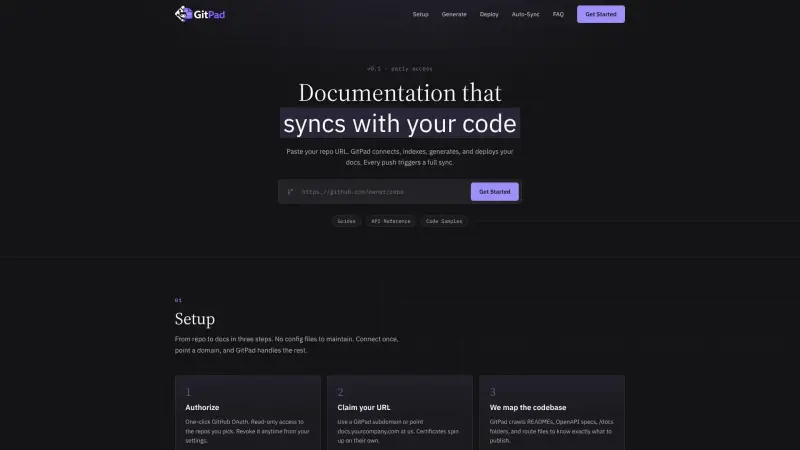
Gitpadai transforms your GitHub repositories into live, always-current documentation sites, complete with guides, API references, and code samples. It's designed for developers and teams who want to keep their documentation perfectly synchronized with their codebase without any extra manual steps or separate workflows.
By connecting directly to your GitHub repo, Gitpadai automates the entire documentation process, from indexing your source files to generating and deploying a production-ready website that updates automatically with every commit you push.
Details
Key Features
- **Automated Sync with GitHub:** Every push to your GitHub repository automatically triggers a full documentation rebuild and deployment, ensuring your docs are always up to date.
- **Comprehensive Documentation Generation:** Automatically generates multiple layers of documentation, including onboarding guides, detailed API reference pages, and practical code samples.
- **Custom Domain Support with Auto SSL:** Connect your own domain (e.g., docs.yourcompany.com) to your documentation site, complete with automatically provisioned SSL certificates.
- **SEO-Optimized Deployment:** Deploys documentation as static HTML, pre-rendered for fast load times and strong Core Web Vitals, with automatic sitemap, robots.txt, meta tags, and Open Graph data for search engines.
Best For
- **Software Development Teams:** Teams that maintain public or private APIs and need to provide up-to-date, interactive documentation for users or internal stakeholders.
- **Developers Managing Open-Source Projects:** Individuals or groups looking to publish polished guides and API references that automatically reflect their latest code changes.
- **Organizations Prioritizing Developer Experience:** Companies aiming to reduce the friction of using their APIs by offering high-quality, easily searchable, and always-synced documentation.
Top Use Cases
- **Publishing API Reference Documentation:** Automatically create interactive API documentation from OpenAPI specs and route files, detailing every endpoint.
- **Creating User Guides and Onboarding Material:** Generate "Getting Started" guides and other onboarding pages directly from content in your repository.
- **Providing Live Code Samples:** Offer copyable code snippets in multiple programming languages, enabling users to quickly integrate and test API calls.
- **Ensuring Documentation Stays Current:** Maintain documentation that is always in sync with the latest codebase, eliminating manual updates and reducing errors.
Integrations
- **GitHub:** Gitpadai offers one-click GitHub OAuth for read-only access to selected repositories and utilizes GitHub webhooks to trigger automatic documentation updates on every push.
- **OpenAPI Specification:** It can read and publish API definitions directly from OpenAPI specifications within your repository.
- **Custom Domains:** Supports pointing custom domains (e.g., docs.yourcompany.com) to your generated documentation site.
Pros
- Automated documentation sync with GitHub
- generates rich guides, API references, and code samples
- SEO-optimized static deployments with auto-SSL
- simple 3-step setup with no config files.
Limitations
- Early access product (v0.1)
- tightly coupled to GitHub as the sole source control integration
- requires read-only GitHub access to repos for indexing.
Read full editorial notes
What is Gitpadai?
Gitpadai is a tool that automates the creation and deployment of documentation directly from your GitHub repositories. It streamlines the process of turning code and related files into user-friendly guides, comprehensive API references, and runnable code samples.
What are the key features of Gitpadai?
**Automated Sync with GitHub:** Every push to your GitHub repository automatically triggers a full documentation rebuild and deployment, ensuring your docs are always up to date.
**Comprehensive Documentation Generation:** Automatically generates multiple layers of documentation, including onboarding guides, detailed API reference pages, and practical code samples.
**Custom Domain Support with Auto SSL:** Connect your own domain (e.g.,
docs.yourcompany.com) to your documentation site, complete with automatically provisioned SSL certificates.**SEO-Optimized Deployment:** Deploys documentation as static HTML, pre-rendered for fast load times and strong Core Web Vitals, with automatic sitemap, robots.txt, meta tags, and Open Graph data for search engines.
**Intelligent Codebase Mapping:** Crawls common documentation sources within your repo like
README.md, OpenAPI specs,/docsfolders, and route files to understand and publish relevant content.**Run Requests in Any Language:** Provides runnable code samples in various languages (e.g., TypeScript, Python, cURL) directly within the API reference, allowing users to copy and test requests easily.
Who is Gitpadai best for?
**Software Development Teams:** Teams that maintain public or private APIs and need to provide up-to-date, interactive documentation for users or internal stakeholders.
**Developers Managing Open-Source Projects:** Individuals or groups looking to publish polished guides and API references that automatically reflect their latest code changes.
**Organizations Prioritizing Developer Experience:** Companies aiming to reduce the friction of using their APIs by offering high-quality, easily searchable, and always-synced documentation.
What can you use Gitpadai for?
**Publishing API Reference Documentation:** Automatically create interactive API documentation from OpenAPI specs and route files, detailing every endpoint.
**Creating User Guides and Onboarding Material:** Generate "Getting Started" guides and other onboarding pages directly from content in your repository.
**Providing Live Code Samples:** Offer copyable code snippets in multiple programming languages, enabling users to quickly integrate and test API calls.
**Ensuring Documentation Stays Current:** Maintain documentation that is always in sync with the latest codebase, eliminating manual updates and reducing errors.
How does Gitpadai compare to alternatives?
**Compared to Manual Documentation Workflows:** Gitpadai fully automates the generation and deployment process, eliminating the need for separate manual builds, publishing, or version control for documentation, which often lags behind code.
**Compared to Static Site Generators Requiring Manual Integration:** While other static site generators can build documentation, Gitpadai integrates directly with GitHub, handles content extraction (OpenAPI, routes, markdown), and automates deployment on every push without custom configurations or build scripts.
What integrations and ecosystem support does Gitpadai offer?
**GitHub:** Gitpadai offers one-click GitHub OAuth for read-only access to selected repositories and utilizes GitHub webhooks to trigger automatic documentation updates on every push.
**OpenAPI Specification:** It can read and publish API definitions directly from OpenAPI specifications within your repository.
**Custom Domains:** Supports pointing custom domains (e.g.,
docs.yourcompany.com) to your generated documentation site.
What are the pros and limitations of Gitpadai?
Pros: Automated documentation sync with GitHub; generates rich guides, API references, and code samples; SEO-optimized static deployments with auto-SSL; simple 3-step setup with no config files.
Limitations: Early access product (v0.1); tightly coupled to GitHub as the sole source control integration; requires read-only GitHub access to repos for indexing.
Built with
Keep researching Gitpadai
Explore relevant products with a similar category, audience, or use case.



Launched
Ownership
If this is your product, contact us and we can help transfer it to you.
 ChatGPT,
 Claude,
 Perplexity,
 Gemini

