


DocsAlot
Publish AI-readable docs for startups
- Use Cases
- API Documentation Documentation Creation
- Pricing View
- Subscription
- Platforms
- Browser
- Ideal For
- Developers DevOps Teams
Overview
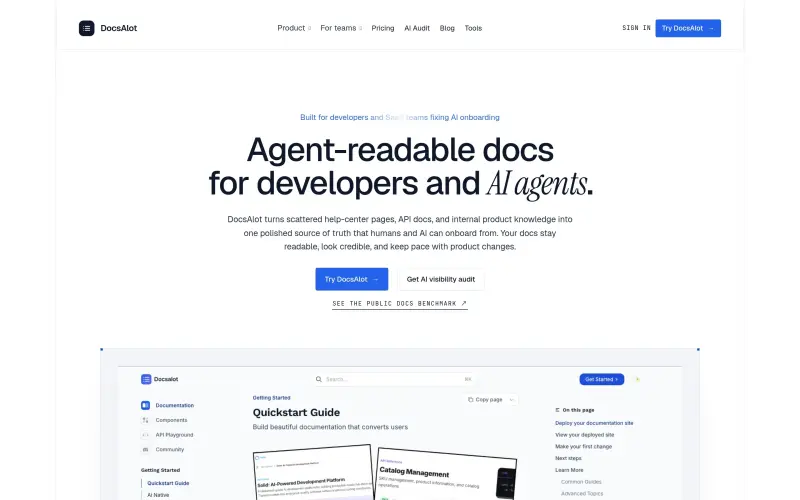
DocsAlot helps startups create and publish AI-readable help centers and developer documentation, ensuring that their documentation stays up to date and is easily accessible to both humans and AI agents.
By integrating with existing documentation sources, such as GitHub docs, help-center articles, and API references, DocsAlot provides a polished source of truth that streamlines the onboarding process for developers and AI agents alike, reducing the complexity and fragmentation often associated with scattered documentation.
Details
Key Features
- Hosted documentation that stays up to date, reducing the need for manual updates and ensuring that AI agents have access to the most current information.
- Integration with existing documentation sources, such as GitHub docs, help-center articles, and API references, to provide a unified source of truth.
- Creation of stable anchors, clean markdown, llms.txt, skill.md, and MCP-ready chunks from the same source, making it easy to publish and maintain documentation.
- AI visibility audit and benchmark reports to help teams identify gaps and areas for improvement in their documentation.
Best For
- Startups and SaaS teams that need to create and maintain high-quality documentation for their products and services.
- Developers and technical teams that require easy access to current and accurate documentation to streamline their onboarding and development processes.
- Teams that use AI tools and agents, such as Codex, Cursor, and Claude, and need to ensure that their documentation is AI-readable and up to date.
Top Use Cases
- Creating and publishing AI-readable help centers and developer documentation to streamline onboarding and integration with AI tools.
- Integrating with existing documentation sources to provide a unified source of truth and reduce fragmentation.
- Conducting AI visibility audits and generating benchmark reports to identify areas for improvement in documentation.
Integrations
- DocsAlot integrates with GitHub docs, help-center articles, API references, and other documentation sources to provide a unified source of truth.
Pros
- streamlined documentation creation and maintenance
- integrated approach to documentation
- AI-readability and visibility audit capabilities.
Read full editorial notes
What is DocsAlot?
DocsAlot is a platform that enables startups to create, host, and maintain high-quality documentation that is both human-readable and AI-readable, allowing for seamless onboarding and integration with AI tools. It connects product knowledge, documentation sources, and AI-facing outputs to provide a unified and current source of truth.
What are the key features of DocsAlot?
Hosted documentation that stays up to date, reducing the need for manual updates and ensuring that AI agents have access to the most current information.
Integration with existing documentation sources, such as GitHub docs, help-center articles, and API references, to provide a unified source of truth.
Creation of stable anchors, clean markdown, llms.txt, skill.md, and MCP-ready chunks from the same source, making it easy to publish and maintain documentation.
AI visibility audit and benchmark reports to help teams identify gaps and areas for improvement in their documentation.
Support for multiple output formats, including hosted docs, machine-readable files, and audit surfaces, to cater to different use cases and workflows.
Who is DocsAlot best for?
Startups and SaaS teams that need to create and maintain high-quality documentation for their products and services.
Developers and technical teams that require easy access to current and accurate documentation to streamline their onboarding and development processes.
Teams that use AI tools and agents, such as Codex, Cursor, and Claude, and need to ensure that their documentation is AI-readable and up to date.
What can you use DocsAlot for?
Creating and publishing AI-readable help centers and developer documentation to streamline onboarding and integration with AI tools.
Integrating with existing documentation sources to provide a unified source of truth and reduce fragmentation.
Conducting AI visibility audits and generating benchmark reports to identify areas for improvement in documentation.
How does DocsAlot compare to alternatives?
DocsAlot provides a more streamlined and integrated approach to documentation creation and maintenance compared to manual methods or local tools, which can be time-consuming and prone to errors.
DocsAlot offers more advanced features and capabilities compared to native platform features, such as GitHub documentation, which may not provide the same level of integration and AI-readability.
What integrations and ecosystem support does DocsAlot offer?
DocsAlot integrates with GitHub docs, help-center articles, API references, and other documentation sources to provide a unified source of truth.
What are the pros of DocsAlot?
Pros: streamlined documentation creation and maintenance; integrated approach to documentation; AI-readability and visibility audit capabilities.
Built with
Keep researching DocsAlot
Explore relevant products with a similar category, audience, or use case.


Resources
Social Profiles
Useful Links
Launched
Ownership
If this is your product, contact us and we can help transfer it to you.
 ChatGPT,
 Claude,
 Perplexity,
 Gemini

