



Mac Pet
Stay productive with a fun companion that tracks your work sessions and activity streaks.
- Use Cases
- Time Management
- Pricing
- One-time Payment
- Platforms
- Not listed yet
- Ideal For
- Solopreneurs General Productivity
Overview
Unlock a More Productive You with Mac Pet, Your Personalized Menu Bar Companion
Mac Pet helps you stay focused and on track by providing a fun and interactive way to manage your time, making it an essential tool for anyone looking to boost their productivity and work-life balance.
Details
Key Features
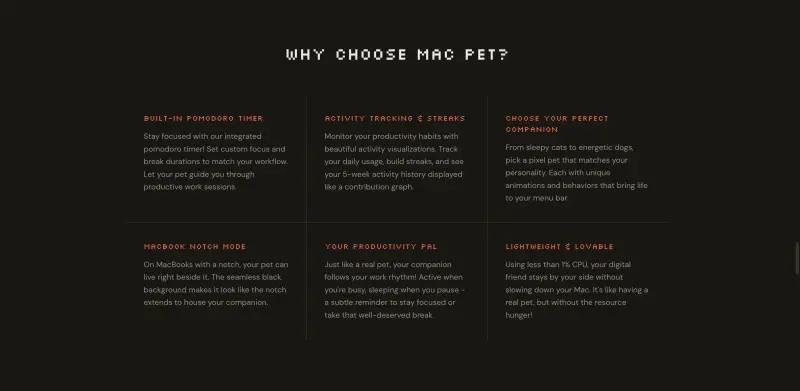
- Customizable Pomodoro timer to help you stay focused and avoid burnout, with personalized work and break sessions tailored to your unique needs
- Seamless integration with your Mac's menu bar or MacBook notch, providing an intuitive and non-intrusive way to track your productivity
- Unique and adorable pixel art pets that bring a touch of personality to your workspace, with each pet having its own distinct animations and behaviors
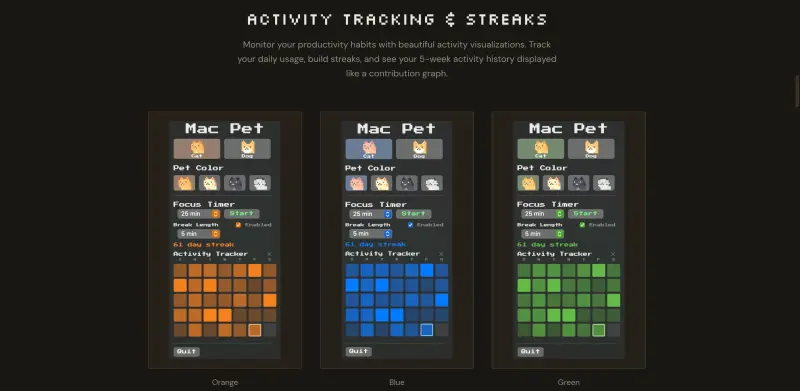
- Activity tracking and streaks to help you monitor your progress and stay motivated, with beautiful visualizations and insights into your daily habits
Best For
- Remote workers and freelancers looking to stay organized and motivated while working from home
- Students and researchers who need to manage their time effectively to meet deadlines and achieve their goals
- Anyone looking to boost their productivity and reduce distractions in a fun and engaging way
Top Use Cases
- Using Mac Pet to stay focused during long study sessions or work hours, with customized Pomodoro sessions to help you stay on track
- Tracking daily activity and building streaks to develop healthy habits and a consistent routine, with insights into your progress and motivation to keep you going
- Personalizing your menu bar with a unique and adorable pixel art pet that reflects your personality and style
Integrations
- Seamless integration with macOS, ensuring a native and intuitive user experience that feels like an extension of your Mac
Pros
- Fun and engaging way to boost productivity, customizable Pomodoro timer, and lightweight design that won't slow down your Mac
Limitations
- Limited to macOS 10.15 and newer versions, and may not be suitable for users who prefer a more traditional or complex productivity tool
Read full editorial notes
Key Features
- Customizable Pomodoro timer to help you stay focused and avoid burnout, with personalized work and break sessions tailored to your unique needs
- Seamless integration with your Mac's menu bar or MacBook notch, providing an intuitive and non-intrusive way to track your productivity
- Unique and adorable pixel art pets that bring a touch of personality to your workspace, with each pet having its own distinct animations and behaviors
- Activity tracking and streaks to help you monitor your progress and stay motivated, with beautiful visualizations and insights into your daily habits
- Lightweight design that won't slow down your Mac, using less than 1% CPU to ensure a seamless user experience
Ideal For
- Remote workers and freelancers looking to stay organized and motivated while working from home
- Students and researchers who need to manage their time effectively to meet deadlines and achieve their goals
- Anyone looking to boost their productivity and reduce distractions in a fun and engaging way
Top Use Cases
- Using Mac Pet to stay focused during long study sessions or work hours, with customized Pomodoro sessions to help you stay on track
- Tracking daily activity and building streaks to develop healthy habits and a consistent routine, with insights into your progress and motivation to keep you going
- Personalizing your menu bar with a unique and adorable pixel art pet that reflects your personality and style
Known Alternatives
- Traditional Pomodoro timers that lack the personality and engagement of Mac Pet, making them less effective at keeping you motivated and focused
- Other productivity apps that are cluttered and distracting, unlike Mac Pet's minimalist and intuitive design
Integrations & Ecosystem
- Seamless integration with macOS, ensuring a native and intuitive user experience that feels like an extension of your Mac
Pros & Cons
- Pros: Fun and engaging way to boost productivity, customizable Pomodoro timer, and lightweight design that won't slow down your Mac
- Limitations: Limited to macOS 10.15 and newer versions, and may not be suitable for users who prefer a more traditional or complex productivity tool
Keep researching Mac Pet
Explore relevant products with a similar category, audience, or use case.



Resources
Social Profiles
FAQ about Mac Pet
Concise answers based on the product's editorial information.
Will Mac Pet work on my Mac?
Mac Pet is compatible with macOS 10.15 and newer versions, ensuring a seamless and intuitive user experience on your Mac.
How do I get started with Mac Pet?
Simply download and launch Mac Pet, and your new companion will appear in your menu bar instantly, with no complex setup or account required.
Launched
Ownership
If this is your product, contact us and we can help transfer it to you.
 ChatGPT,
 Claude,
 Perplexity,
 Gemini

