Makro

Makro
Boost productivity with unlimited macros and local AI, while keeping your data private and secure across all devices
- Use Cases
- Not listed yet
- Pricing View
- Subscription
- Platforms
- Not listed yet
Overview
Free Text Expander for Chrome & Edge: Type Less, Achieve More
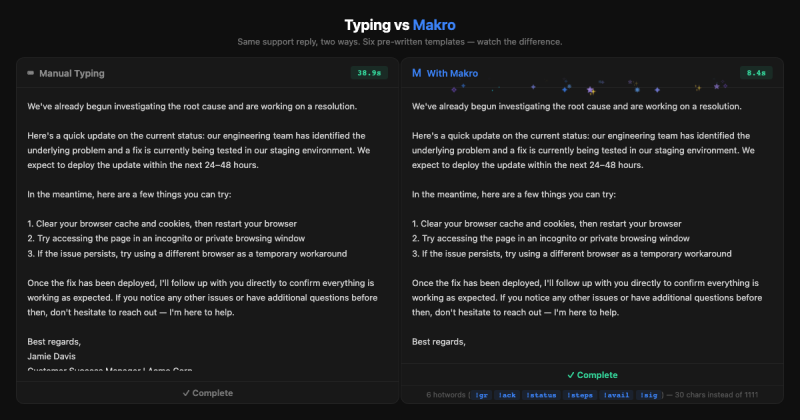
The Free Text Expander for Chrome & Edge is here to solve a common problem we all face: retyping the same text over and over. Whether it's a signature, a common response, or a set of instructions, this tool helps you save time and increase productivity by automating your text expansion needs.


Details
Key Features
- Unlimited macros to help you automate repetitive text tasks, making it easier to focus on more important things.
- Zero-knowledge encryption, ensuring your data is protected and only you have access to it, giving you peace of mind while you work.
- Smart Rewrite feature with Ollama or LM Studio, allowing you to rewrite text in different tones and styles, which can be a huge time-saver for writers and communicators.
- Instant text expansion that works in any text field, even offline, so you can stay productive wherever you are.
Best For
- Remote workers and freelancers who need to communicate with clients and teams efficiently.
- Customer support teams that often respond to similar inquiries and want to provide quick, personalized answers.
- Writers and bloggers who want to streamline their writing process and focus on creating high-quality content.
Top Use Cases
- Automating email responses to common questions, saving you time and reducing the likelihood of errors.
- Creating custom signatures for work emails or social media profiles, helping you maintain a professional online presence.
- Expanding abbreviations or acronyms in technical writing, making your content more accessible and easier to understand.
Integrations
- Works seamlessly with Chrome, Edge, Firefox, and Brave browsers, making it easy to use across different platforms.
Pros
- Unlimited macros, zero-knowledge encryption, and smart rewrite features make it a powerful tool for text expansion and automation.
Limitations
- May not be suitable for very large teams or enterprises that require custom solutions and support, as it's designed for individual users and small teams.
Read full editorial notes
Key Features
- Unlimited macros to help you automate repetitive text tasks, making it easier to focus on more important things.
- Zero-knowledge encryption, ensuring your data is protected and only you have access to it, giving you peace of mind while you work.
- Smart Rewrite feature with Ollama or LM Studio, allowing you to rewrite text in different tones and styles, which can be a huge time-saver for writers and communicators.
- Instant text expansion that works in any text field, even offline, so you can stay productive wherever you are.
- Organize and sync your macros across devices with end-to-end encryption, making it easy to access your text expansions from anywhere.
Ideal For
- Remote workers and freelancers who need to communicate with clients and teams efficiently.
- Customer support teams that often respond to similar inquiries and want to provide quick, personalized answers.
- Writers and bloggers who want to streamline their writing process and focus on creating high-quality content.
Top Use Cases
- Automating email responses to common questions, saving you time and reducing the likelihood of errors.
- Creating custom signatures for work emails or social media profiles, helping you maintain a professional online presence.
- Expanding abbreviations or acronyms in technical writing, making your content more accessible and easier to understand.
Known Alternatives
- A more private alternative to TextExpander, focusing on zero-knowledge encryption and user data protection.
- A lightweight option compared to Briskine, with a simpler, more intuitive interface for easier text expansion management.
Integrations & Ecosystem
- Works seamlessly with Chrome, Edge, Firefox, and Brave browsers, making it easy to use across different platforms.
Pros & Cons
- Pros: Unlimited macros, zero-knowledge encryption, and smart rewrite features make it a powerful tool for text expansion and automation.
- Limitations: May not be suitable for very large teams or enterprises that require custom solutions and support, as it's designed for individual users and small teams.
Frequently Asked Questions
- Is the Free Text Expander for Chrome & Edge really free?
- Yes, it offers a free tier with unlimited macros, and no account is required to get started. You can also try the Pro version free for 30 days.
- How does the text expander protect my data?
- Your data is protected with AES-256-GCM encryption, and the keys are derived locally on your device, ensuring that only you have access to your macros and expansions.
Alternatives
A shortlist of related products to compare before you leave the page.

Sider
AI assistant sidebar for every website you visit
Productivity
Subscription
The tool excels at content-assistance tasks such as reading comprehension, writing support, and quick translations. It supports advanced models and of...
P
PinStats
Pinterest analytics extension revealing hidden pin stats
Marketing
Freemium
The extension seamlessly integrates with Pinterest's interface, automatically displaying critical metrics like saves, repins, likes, comments, and eng...
- Hidden Stats Revelation: Instantly reveals saves, repins, likes, comments, and engagement rates for every pin you browse, providing insights that Pinterest keeps hidden
- Advanced Filtering & Sorting: Filter pins by performance metrics and sort by saves, engagement rates, creation date, or custom parameters to identify trends quickly
- High-Resolution Media Downloads: Save images and videos from Pinterest at their original quality, perfect for content creators and marketers needing visual assets

Wandpen
Distraction-free Chrome extension for instant text improvement
Productivity
Freemium
Created by developer Nithur M, who experienced the same writing struggles many professionals face, Wandpen appears when you select text you've written...
- Universal Integration: Works in Gmail, Google Docs, social media, and any website text field for seamless writing assistance
- Multiple AI Models: Access to GPT-4o-mini, Claude 3.5 Sonnet, Gemini 1.5 Pro, and other intelligent models for diverse writing needs
- Instant Text Selection: Simply highlight written text to trigger AI-powered improvements, paraphrasing, and grammar corrections
Resources
Useful Links
FAQ
Common questions extracted from the editorial product description.
Is the Free Text Expander for Chrome & Edge really free?
Yes, it offers a free tier with unlimited macros, and no account is required to get started. You can also try the Pro version free for 30 days.
How does the text expander protect my data?
Your data is protected with AES-256-GCM encryption, and the keys are derived locally on your device, ensuring that only you have access to your macros and expansions.
Submitted by

TechHQ
Launched
Ideal for
Bloggers
Content Creators