


NotchNest AI
Supercharge your workflow with intelligent features that simplify task management and boost focus.
Overview
Unlock Enhanced Productivity with NotchNest AI: The Ultimate Notch Enhancement App for Mac
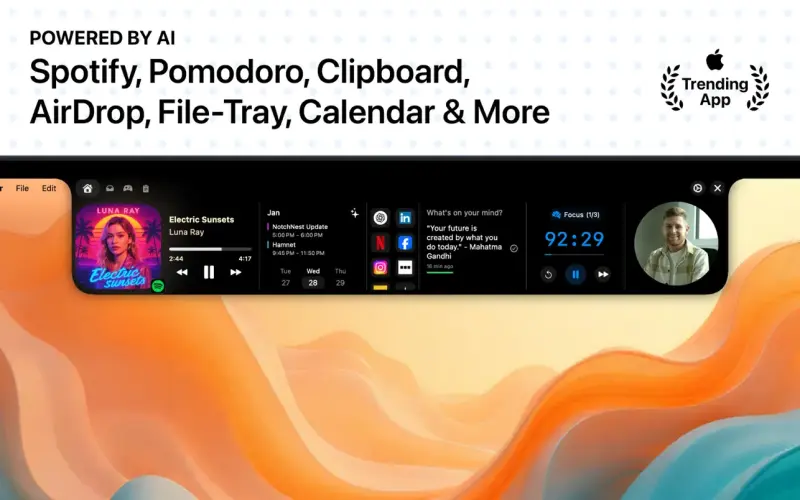
NotchNest AI solves the problem of cluttered workspaces and forgotten tasks by seamlessly integrating essential productivity tools right into your Mac's notch, keeping everything you need within easy reach and now enhanced with intelligent AI features.
Details
Key Features
- AI-powered clipboard manager that saves time by allowing instant access to your clipboard history and enabling AI-driven text refinement and summarization.
- Native Apple Calendar support with smart AI-powered briefings for upcoming events, meetings, and deadlines, ensuring you stay on top of your schedule.
- Quick Notes with AI suggestions and refinements, syncing across your Apple devices to ensure you never lose a brilliant idea, and providing an enhanced writing experience.
- Instant bookmarks access and custom shortcuts for your favorite websites and web apps, streamlining your workflow and saving you time.
Best For
- Professionals seeking to enhance their productivity and streamline their workflow on Mac devices.
- Students and researchers who need to manage multiple tasks, notes, and files efficiently.
- Business owners and entrepreneurs looking for a tool to help them stay organized and focused on their goals.
Top Use Cases
- Streamlining workflow by integrating essential productivity tools into the notch, reducing the need to switch between apps and windows.
- Enhancing writing and note-taking experiences with AI-powered suggestions and refinements, leading to more effective communication and idea development.
- Improving time management and focus with the Pomodoro Timer and calendar features, resulting in increased productivity and reduced stress.
Integrations
- Seamless integration with native Apple apps and services, including Calendar, Notes, and Music, as well as support for AirDrop and other macOS features.
Pros
- Enhanced productivity, streamlined workflow, AI-powered features, and a user-friendly interface that feels native to macOS.
Limitations
- May require some time to get accustomed to the new features and layout, and the app's effectiveness depends on the user's existing workflow and habits.
Read full editorial notes
Key Features
- AI-powered clipboard manager that saves time by allowing instant access to your clipboard history and enabling AI-driven text refinement and summarization.
- Native Apple Calendar support with smart AI-powered briefings for upcoming events, meetings, and deadlines, ensuring you stay on top of your schedule.
- Quick Notes with AI suggestions and refinements, syncing across your Apple devices to ensure you never lose a brilliant idea, and providing an enhanced writing experience.
- Instant bookmarks access and custom shortcuts for your favorite websites and web apps, streamlining your workflow and saving you time.
- Pomodoro Timer and File-Tray features that boost focus and productivity without cluttering your screen, allowing for more efficient work sessions and file management.
Ideal For
- Professionals seeking to enhance their productivity and streamline their workflow on Mac devices.
- Students and researchers who need to manage multiple tasks, notes, and files efficiently.
- Business owners and entrepreneurs looking for a tool to help them stay organized and focused on their goals.
Top Use Cases
- Streamlining workflow by integrating essential productivity tools into the notch, reducing the need to switch between apps and windows.
- Enhancing writing and note-taking experiences with AI-powered suggestions and refinements, leading to more effective communication and idea development.
- Improving time management and focus with the Pomodoro Timer and calendar features, resulting in increased productivity and reduced stress.
Known Alternatives
- A more integrated and user-friendly alternative to NotchNook, offering a wider range of features and AI-powered capabilities.
- A privacy-focused and lightweight solution compared to other productivity apps, ensuring your data stays local and secure on your Mac device.
Integrations & Ecosystem
- Seamless integration with native Apple apps and services, including Calendar, Notes, and Music, as well as support for AirDrop and other macOS features.
Pros & Cons
- Pros: Enhanced productivity, streamlined workflow, AI-powered features, and a user-friendly interface that feels native to macOS.
- Limitations: May require some time to get accustomed to the new features and layout, and the app's effectiveness depends on the user's existing workflow and habits.
Keep researching NotchNest AI
Explore relevant products with a similar category, audience, or use case.
 Shotwell
Transform your iPhone screenshots into stunning visuals with effortless editing and export capabilities
Shotwell
Transform your iPhone screenshots into stunning visuals with effortless editing and export capabilities
 Barometric Pressure
Stay ahead of changing weather conditions with accurate offline pressure tracking and personalized alerts for better health and outdoor planning.
Barometric Pressure
Stay ahead of changing weather conditions with accurate offline pressure tracking and personalized alerts for better health and outdoor planning.
 oioi
Clipboard history at your fingertips
oioi
Clipboard history at your fingertips
FAQ about NotchNest AI
Concise answers based on the product's editorial information.
Is NotchNest AI secure and private?
Yes, NotchNest AI prioritizes privacy, with all data staying local on your device and AI features running entirely on your Mac using Apple Intelligence.
Can I customize the features and layout of NotchNest AI?
While the app offers a range of features and tools, the layout and design are optimized for a seamless user experience, with some customization options available for bookmarks and notes.
Launched
Ownership
If this is your product, contact us and we can help transfer it to you.
 ChatGPT,
 Claude,
 Perplexity,
 Gemini

