


PicPoints
Create interactive image maps and floor plans
- Use Cases
- Product Descriptions UI Design
- Pricing View
- Subscription
- Ideal For
- Agencies E-commerce Owners
Overview
PicPoints is an advanced WordPress plugin engineered to create high-performance interactive images, multi-level floor plans, and shoppable lookbooks with exceptional clarity. It empowers developers, businesses, and real estate professionals to build visually rich, responsive content that integrates seamlessly and performs flawlessly on any website. Choose PicPoints for its modern vector editor and unique architecture that eliminates common WordPress compatibility issues.
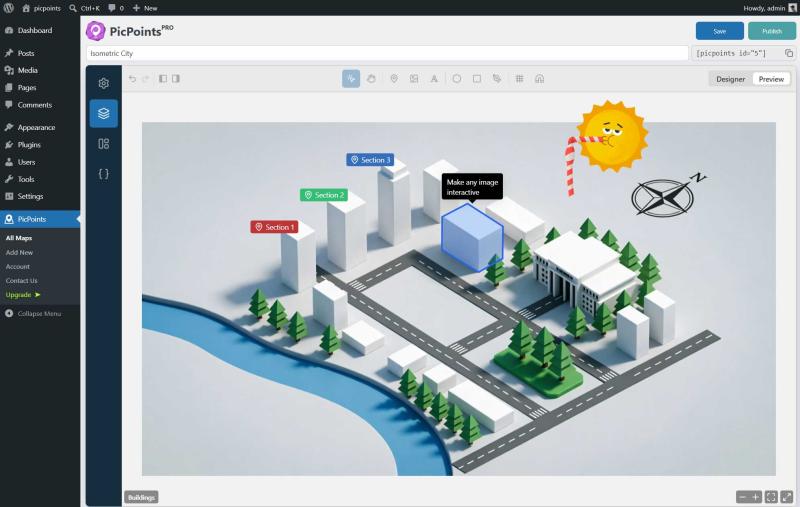
Unlike traditional image map plugins that often struggle with theme conflicts or performance bottlenecks, PicPoints leverages an innovative Shadow DOM architecture. This ensures your interactive elements remain untouched by theme styles and won't slow down your site. Users get a powerful, Figma-like vector editor directly in WordPress, allowing them to draw precise shapes, manage layers, and create dynamic content with unparalleled ease.
Details
Key Features
- **Isolated Shadow DOM Architecture:** Guarantees zero CSS conflicts with your WordPress theme, ensuring 100% visual consistency on any website.
- **Extreme Performance:** Hardcore optimization allows for smooth operation, tested with up to 1,000 active vector elements on a single canvas without lagging your website.
- **Pro-Grade Vector Editor:** Draw intricate shapes like ellipses, rectangles, markers, and custom polygons with pixel-perfect accuracy using native Bezier curves, all within WordPress.
- **Multi-Scene & Multi-Level Canvas:** Ideal for complex structures, such as multi-story real estate floor plans or architectural blueprints, enabling organization across multiple levels.
Best For
- **Developers and Web Agencies:** Seeking a modern, performant, and conflict-free solution for interactive content.
- **Real Estate Professionals:** Needing to build multi-story floor plans, property showcases, or interactive virtual tours.
- **E-commerce Businesses:** Looking to create shoppable product lookbooks, interactive product anatomy diagrams, or detailed item showcases.
- **Event Organizers & Businesses:** Crafting vector-accurate event maps or interactive guides with clickable points of interest.
Top Use Cases
- Building detailed multi-story real estate floor plans with interactive rooms and property details.
- Creating shoppable e-commerce lookbooks that allow customers to click directly on products within an image.
- Designing interactive product anatomy showcases, explainer diagrams, or comprehensive event maps with clickable hotspots.
- Developing interactive training materials, informational diagrams, or complex architectural blueprints.
Integrations
- WooCommerce integration for linking interactive markers directly to product pages.
- Developer API access to connect interactive maps with other systems and custom functionalities.
- Support for importing SVG layers from professional design tools like Adobe Illustrator or Inkscape, including automatic layer tree and partial style retention.
- Advanced Handlebars Templates for building highly dynamic, data-driven layouts within tooltips and popups without complex coding.
Pros
- Full CSS and JavaScript isolation prevents conflicts with themes and other plugins
- extreme performance optimized for many interactive elements
- includes a powerful, intuitive vector editor within WordPress.
Limitations
- The free version has limits on the number of maps (max 3), scenes (max 3), and interactive layers/markers per scene (max 10)
Read full editorial notes
What is PicPoints?
PicPoints is a WordPress plugin that lets you create advanced interactive images, multi-level floor plans, and vector-accurate responsive image maps directly within your dashboard. It equips users with a professional vector editor that transforms static images into dynamic, clickable experiences for various applications.
What are the key features of PicPoints?
**Isolated Shadow DOM Architecture:** Guarantees zero CSS conflicts with your WordPress theme, ensuring 100% visual consistency on any website.
**Extreme Performance:** Hardcore optimization allows for smooth operation, tested with up to 1,000 active vector elements on a single canvas without lagging your website.
**Pro-Grade Vector Editor:** Draw intricate shapes like ellipses, rectangles, markers, and custom polygons with pixel-perfect accuracy using native Bezier curves, all within WordPress.
**Multi-Scene & Multi-Level Canvas:** Ideal for complex structures, such as multi-story real estate floor plans or architectural blueprints, enabling organization across multiple levels.
**Figma-Like Layer Management:** Easily group, rename, and organize your vector shapes and markers in a hierarchical structure for a streamlined editing workflow.
**Rich Tooltips & Popups:** Create automated tooltips on hover, or open rich-media popups (images, text, iframes) on click for detailed, interactive content.
Who is PicPoints best for?
**Developers and Web Agencies:** Seeking a modern, performant, and conflict-free solution for interactive content.
**Real Estate Professionals:** Needing to build multi-story floor plans, property showcases, or interactive virtual tours.
**E-commerce Businesses:** Looking to create shoppable product lookbooks, interactive product anatomy diagrams, or detailed item showcases.
**Event Organizers & Businesses:** Crafting vector-accurate event maps or interactive guides with clickable points of interest.
What can you use PicPoints for?
Building detailed multi-story real estate floor plans with interactive rooms and property details.
Creating shoppable e-commerce lookbooks that allow customers to click directly on products within an image.
Designing interactive product anatomy showcases, explainer diagrams, or comprehensive event maps with clickable hotspots.
Developing interactive training materials, informational diagrams, or complex architectural blueprints.
How does PicPoints compare to alternatives?
Many traditional WordPress image map plugins rely on outdated methods that often break when themes update; PicPoints uses Shadow DOM to guarantee 100% CSS and JS isolation, preventing such conflicts.
Unlike clunky backend forms or basic jQuery-based plugins, PicPoints provides a modern, Figma-like vector editor built with React & TypeScript directly inside your WordPress dashboard, offering a superior and more precise editing experience.
What integrations and ecosystem support does PicPoints offer?
WooCommerce integration for linking interactive markers directly to product pages.
Developer API access to connect interactive maps with other systems and custom functionalities.
Support for importing SVG layers from professional design tools like Adobe Illustrator or Inkscape, including automatic layer tree and partial style retention.
Advanced Handlebars Templates for building highly dynamic, data-driven layouts within tooltips and popups without complex coding.
What are the pros and limitations of PicPoints?
Pros: Full CSS and JavaScript isolation prevents conflicts with themes and other plugins; extreme performance optimized for many interactive elements; includes a powerful, intuitive vector editor within WordPress.
Limitations: The free version has limits on the number of maps (max 3), scenes (max 3), and interactive layers/markers per scene (max 10);
Built with
Keep researching PicPoints
Explore relevant products with a similar category, audience, or use case.



Launched
Ownership
If this is your product, contact us and we can help transfer it to you.
 ChatGPT,
 Claude,
 Perplexity,
 Gemini
