


- Use Cases
- Expense Tracking Bookkeeping
- Pricing View
- Subscription
- Platforms
- Not listed yet
- Ideal For
- Small Businesses Freelancers
Overview
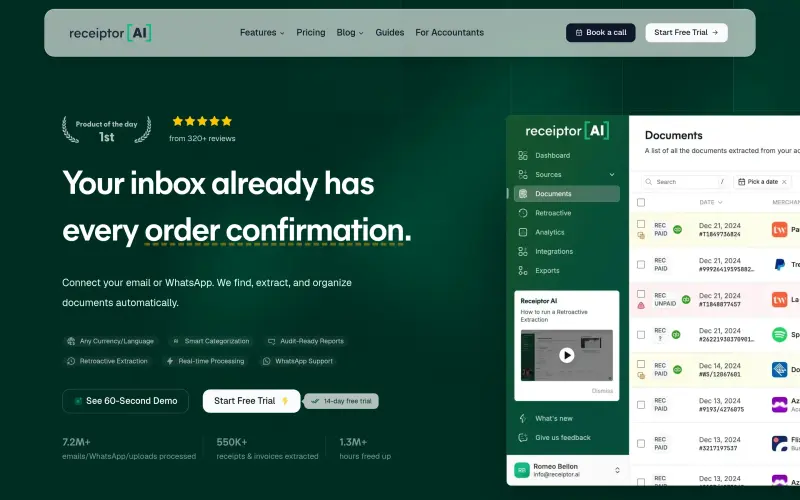
Receiptor is an automated bookkeeping tool that helps small businesses, freelancers, and accountants save time by extracting receipts from emails, WhatsApp messages, and uploads, and organizing them into audit-ready reports.
By connecting your email or WhatsApp to Receiptor, you can automatically find, extract, and organize documents, freeing up hours of manual bookkeeping time and reducing the risk of errors or lost receipts. This makes it easier to focus on growing your business, delivering clean books to clients, or simply enjoying more free time.
Details
Key Features
- Automatic extraction of receipts from emails, WhatsApp, and uploads, with smart categorization and audit-ready reports.
- Retroactive email analysis, allowing you to extract receipts from past emails and get your bookkeeping up to date quickly.
- Multi-entity separation, making it easy to manage multiple businesses or clients from a single account.
- Workflow automations, enabling you to set up custom workflows and automate repetitive tasks.
Best For
- Small businesses, who can use Receiptor to streamline their bookkeeping and focus on growth.
- Freelancers, who can use Receiptor to automate their expense tracking and invoicing.
- Accountants, who can use Receiptor to deliver cleaner books to clients and reduce the time spent on bookkeeping tasks.
Top Use Cases
- Automating the extraction of receipts from emails, WhatsApp, and uploads, and organizing them into categorized reports.
- Streamlining your bookkeeping workflow, by integrating with popular accounting software and automating repetitive tasks.
- Reducing the risk of errors or lost receipts, by using Receiptor's retroactive email analysis and audit-ready reports.
Integrations
- Receiptor integrates with popular accounting software, such as QuickBooks and Xero, and supports exports to CSV, PDF, and ZIP formats.
Pros
- automated receipt extraction
- smart categorization
- integration with popular accounting software
- retroactive email analysis.
Read full editorial notes
What is Receiptor?
Receiptor is a tool that automates the process of extracting receipts from various sources, such as emails, WhatsApp messages, and uploads, and organizes them into categorized, audit-ready reports. It integrates with popular accounting software, making it easy to match transactions to receipts and streamline your bookkeeping workflow.
What are the key features of Receiptor?
Automatic extraction of receipts from emails, WhatsApp, and uploads, with smart categorization and audit-ready reports.
Retroactive email analysis, allowing you to extract receipts from past emails and get your bookkeeping up to date quickly.
Multi-entity separation, making it easy to manage multiple businesses or clients from a single account.
Workflow automations, enabling you to set up custom workflows and automate repetitive tasks.
Currency conversion, supporting receipts and invoices in multiple currencies.
Who is Receiptor best for?
Small businesses, who can use Receiptor to streamline their bookkeeping and focus on growth.
Freelancers, who can use Receiptor to automate their expense tracking and invoicing.
Accountants, who can use Receiptor to deliver cleaner books to clients and reduce the time spent on bookkeeping tasks.
What can you use Receiptor for?
Automating the extraction of receipts from emails, WhatsApp, and uploads, and organizing them into categorized reports.
Streamlining your bookkeeping workflow, by integrating with popular accounting software and automating repetitive tasks.
Reducing the risk of errors or lost receipts, by using Receiptor's retroactive email analysis and audit-ready reports.
How does Receiptor compare to alternatives?
Unlike manual bookkeeping methods, Receiptor automates the extraction and organization of receipts, saving time and reducing errors.
Compared to generic OCR tools, Receiptor provides context-aware categorization and smart categorization, making it easier to match transactions to receipts.
What integrations and ecosystem support does Receiptor offer?
Receiptor integrates with popular accounting software, such as QuickBooks and Xero, and supports exports to CSV, PDF, and ZIP formats.
What are the pros of Receiptor?
Pros: automated receipt extraction; smart categorization; integration with popular accounting software; retroactive email analysis.
Keep researching Receiptor
Explore relevant products with a similar category, audience, or use case.



Resources
Social Profiles
Useful Links
Launched
Ownership
If this is your product, contact us and we can help transfer it to you.
 ChatGPT,
 Claude,
 Perplexity,
 Gemini

