


Recordly
Easily produce professional-looking product demos and walkthroughs without extensive editing
- Use Cases
- Video Editing
- Pricing
- Free
- Platforms
- Not listed yet
- Ideal For
- Content Creators Marketing Teams
Overview
Recordly: Create Polished Screen Recordings Without Editing
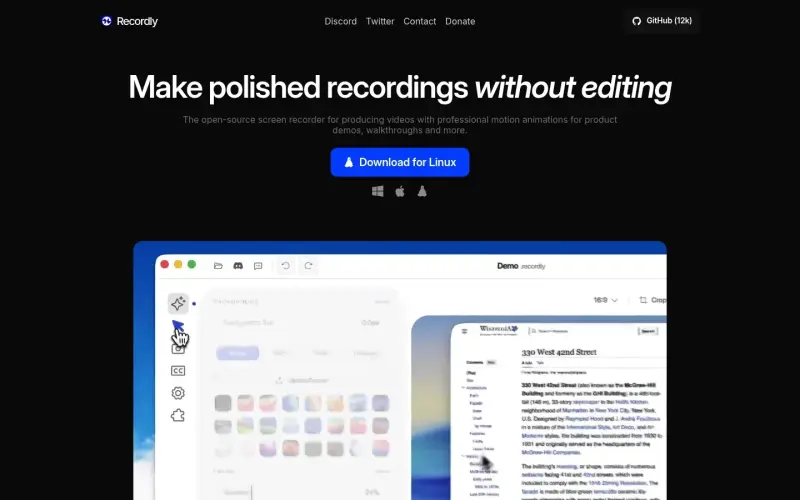
With Recordly, you can make high-quality screen recordings that look professional, without spending hours in post-production - it's a free, open-source tool that helps you create product demos, guided walkthroughs, and more, with features like auto-zoom and motion blur animated cursors.
Details
Key Features
- Automated zooming and cursor animation to keep your recordings engaging
- Minimal interface that stays out of the way, so you can focus on what matters
- Dynamic webcam bubble overlay that expands and shrinks to keep you in the spotlight
- Intuitive timeline editing interface for easy control over video speed, zooms, and annotations
Best For
- Product managers creating demo videos for new features
- Marketing teams producing guided walkthroughs for customers
- Developers making tutorial videos for open-source projects
Top Use Cases
- Creating product demos that showcase new features and functionalities
- Producing guided walkthroughs to help customers understand complex software
- Making tutorial videos for open-source projects or coding tutorials
Integrations
- Available for MacOS, Windows, and Linux, with a community-driven development process
Pros
- Free and open-source, automated features like auto-zoom, and a minimal interface
Limitations
- May have a steeper learning curve for advanced features, and limited support for enterprise-level teams
Read full editorial notes
Key Features
- Automated zooming and cursor animation to keep your recordings engaging
- Minimal interface that stays out of the way, so you can focus on what matters
- Dynamic webcam bubble overlay that expands and shrinks to keep you in the spotlight
- Intuitive timeline editing interface for easy control over video speed, zooms, and annotations
- Dual-source audio capture with sample-accurate sync, so your voice and system audio are always in sync
Ideal For
- Product managers creating demo videos for new features
- Marketing teams producing guided walkthroughs for customers
- Developers making tutorial videos for open-source projects
Top Use Cases
- Creating product demos that showcase new features and functionalities
- Producing guided walkthroughs to help customers understand complex software
- Making tutorial videos for open-source projects or coding tutorials
Known Alternatives
- A free alternative to Screen Studio, with more features and a minimal interface
- A more intuitive option than traditional screen recording software, with automated features like auto-zoom
Integrations & Ecosystem
- Available for MacOS, Windows, and Linux, with a community-driven development process
Pros & Cons
- Pros: Free and open-source, automated features like auto-zoom, and a minimal interface
- Limitations: May have a steeper learning curve for advanced features, and limited support for enterprise-level teams
Keep researching Recordly
Explore relevant products with a similar category, audience, or use case.


Resources
Social Profiles
Useful Links
FAQ about Recordly
Concise answers based on the product's editorial information.
Is Recordly really free?
Yes, Recordly is fully free and open-source, with no paywalls or hidden limits.
Can I use Recordly for commercial purposes?
Yes, Recordly is suitable for commercial use, and you can use it to create product demos, guided walkthroughs, and more.
Launched
Ownership
If this is your product, contact us and we can help transfer it to you.
 ChatGPT,
 Claude,
 Perplexity,
 Gemini

