


RemindTab
Easily manage your reading list and get reminded to read saved pages at the right time, so you never miss important content
- Use Cases
- Not listed yet
- Pricing
- Freemium
- Platforms
- Not listed yet
- Ideal For
- General Productivity Daily Utilities
Overview
RemindTab helps you save and organize web pages, then reminds you to read them at a time you choose, making it easier to manage your online reading list.
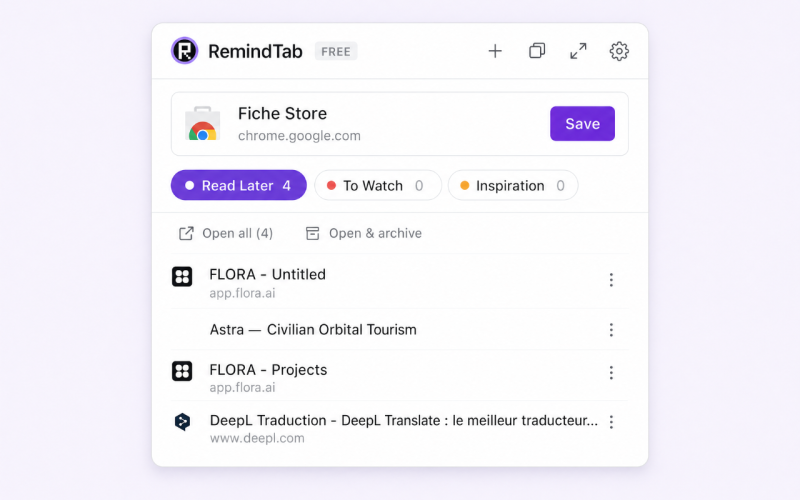
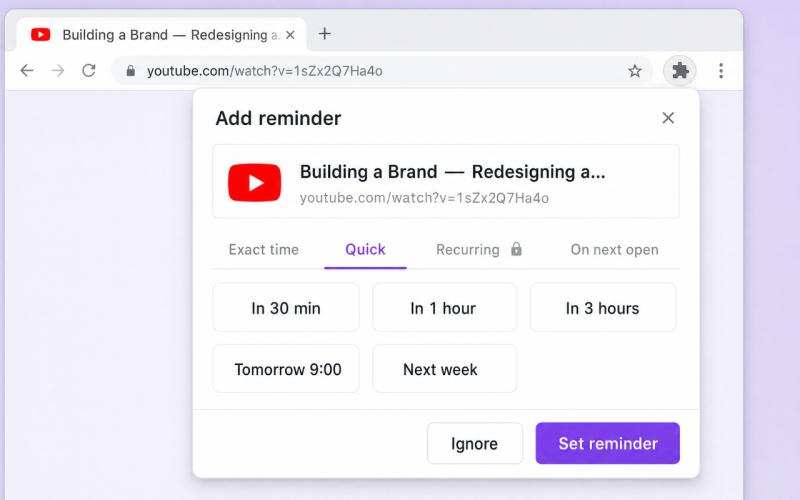
With RemindTab, you can save pages in one click, categorize them for easy access, and set reminders to ensure you don't forget to read them, all within your Chrome browser.
Details
Key Features
- One-click save to quickly add pages to your reading list
- Organization by category, with custom categories and color-coding for easy identification
- Reminders that can be set for exact times, recurring intervals, or when you next open Chrome
- Full page view for a dashboard-style overview of your saved pages, with sorting and filtering options
Best For
- Individuals who want to manage their online reading list more efficiently
- Researchers who need to keep track of multiple sources and references
- Students who want to stay organized and focused on their studies
Integrations
- RemindTab is a Chrome extension, with seamless integration into your Chrome browser
Pros
- easy to use, customizable, and accessible in 16 languages
Limitations
- may not be suitable for large-scale enterprise use, and some features require the Pro version
Read full editorial notes
What are the key features of RemindTab?
One-click save to quickly add pages to your reading list
Organization by category, with custom categories and color-coding for easy identification
Reminders that can be set for exact times, recurring intervals, or when you next open Chrome
Full page view for a dashboard-style overview of your saved pages, with sorting and filtering options
Support for 16 languages, making it accessible to a wide range of users
Who is RemindTab best for?
Individuals who want to manage their online reading list more efficiently
Researchers who need to keep track of multiple sources and references
Students who want to stay organized and focused on their studies
What are the top use cases for RemindTab?
Saving articles to read later, without cluttering your bookmarks or tabs
Organizing resources for a project or research paper, with easy access to relevant pages
Keeping track of websites to visit regularly, with reminders to ensure you don't forget
How does RemindTab compare to alternatives?
Unlike other bookmarking tools, RemindTab focuses on reminders and organization, making it a great choice for those who want to stay on top of their reading list
RemindTab offers a more streamlined and intuitive interface than some other extensions, with a focus on simplicity and ease of use
What integrations and ecosystem support does RemindTab offer?
RemindTab is a Chrome extension, with seamless integration into your Chrome browser
What are the pros and limitations of RemindTab?
Pros: easy to use, customizable, and accessible in 16 languages
Limitations: may not be suitable for large-scale enterprise use, and some features require the Pro version
Keep researching RemindTab
Explore relevant products with a similar category, audience, or use case.



Launched
Ownership
If this is your product, contact us and we can help transfer it to you.
 ChatGPT,
 Claude,
 Perplexity,
 Gemini

