


- Use Cases
- Video Editing Transcript Editing
- Pricing
- Free
- Ideal For
- Content Creators Video Creators
Overview
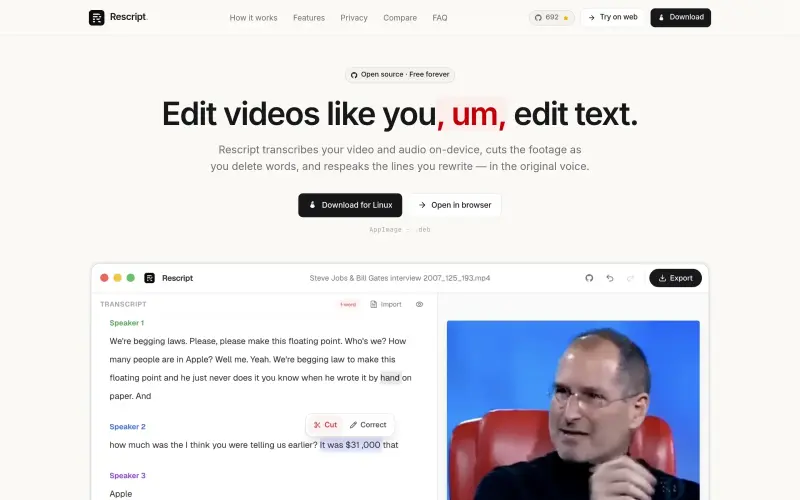
Rescript is a free, open-source video and audio editor that lets you edit media as you edit text, making it easier to work with speech-driven content. It helps creators, podcasters, and videographers refine their recordings without needing to re-record or use complex editing software.
With Rescript, you can transcribe your media locally, delete unwanted words to cut the corresponding footage, and even regenerate lines in the original voice, all without uploading your files to the cloud. This approach streamlines the editing process, saving time and effort, and ensures that your media remains private and secure.
Details
Key Features
- Word-level editing: Delete a phrase, and the cut lands exactly where those words were spoken, allowing for precise control over your media.
- One-click cleanup: Remove filler words and silences with a single click, streamlining your editing process and saving time.
- Regenerate a line: Rewrite a sentence and hear it back in the speaker's own voice, cloned from the existing audio, without needing to re-record.
- Private by design: Transcribing, editing, and exporting all happen on your device, with no account or upload required, ensuring your media remains private and secure.
Best For
- Creators and videographers who need to refine their recordings without complex editing software.
- Podcasters who want to edit their episodes efficiently and maintain control over their media.
- Interviewers and researchers who require a secure and private way to edit and transcribe their recordings.
Top Use Cases
- Refining podcast episodes or video recordings by removing unwanted words or phrases.
- Creating clean transcripts and subtitles for your media, making it more accessible and shareable.
- Regenerating lines or phrases in the original voice, saving time and effort in the editing process.
Integrations
- Rescript supports various file formats, including MP4, WebM, M4A, MP3, and WAV, making it compatible with a wide range of workflows and ecosystems.
Pros
- Private and secure
- efficient transcript-based editing
- flexible export options
- free and open-source.
Limitations
- Limited to speech-driven media
- requires local machine processing power for transcription and regeneration.
Read full editorial notes
What is Rescript?
Rescript is a transcript-based editor that lets you edit video and audio files by adjusting the transcript, which in turn affects the media. It runs on your local machine, ensuring that your files are never uploaded or shared with external services.
What are the key features of Rescript?
Word-level editing: Delete a phrase, and the cut lands exactly where those words were spoken, allowing for precise control over your media.
One-click cleanup: Remove filler words and silences with a single click, streamlining your editing process and saving time.
Regenerate a line: Rewrite a sentence and hear it back in the speaker's own voice, cloned from the existing audio, without needing to re-record.
Private by design: Transcribing, editing, and exporting all happen on your device, with no account or upload required, ensuring your media remains private and secure.
Multi-format export: Save your cut in various formats, including video, audio, transcript, and subtitles, making it easy to share or use in different contexts.
Who is Rescript best for?
Creators and videographers who need to refine their recordings without complex editing software.
Podcasters who want to edit their episodes efficiently and maintain control over their media.
Interviewers and researchers who require a secure and private way to edit and transcribe their recordings.
What can you use Rescript for?
Refining podcast episodes or video recordings by removing unwanted words or phrases.
Creating clean transcripts and subtitles for your media, making it more accessible and shareable.
Regenerating lines or phrases in the original voice, saving time and effort in the editing process.
How does Rescript compare to alternatives?
Unlike cloud-based editing tools, Rescript runs locally on your machine, ensuring your media remains private and secure.
Rescript's transcript-based editing approach offers a more intuitive and efficient way to work with speech-driven content than traditional timeline-based editors.
What integrations and ecosystem support does Rescript offer?
Rescript supports various file formats, including MP4, WebM, M4A, MP3, and WAV, making it compatible with a wide range of workflows and ecosystems.
What are the pros and limitations of Rescript?
Pros: Private and secure; efficient transcript-based editing; flexible export options; free and open-source.
Limitations: Limited to speech-driven media; requires local machine processing power for transcription and regeneration.
Keep researching Rescript
Explore relevant products with a similar category, audience, or use case.



Resources
Social Profiles
Useful Links
Launched
Ownership
If this is your product, contact us and we can help transfer it to you.
 ChatGPT,
 Claude,
 Perplexity,
 Gemini

