


- Use Cases
- Video Editing Video Downloading
- Pricing
- Free
- Ideal For
- Content Creators Video Creators
Overview
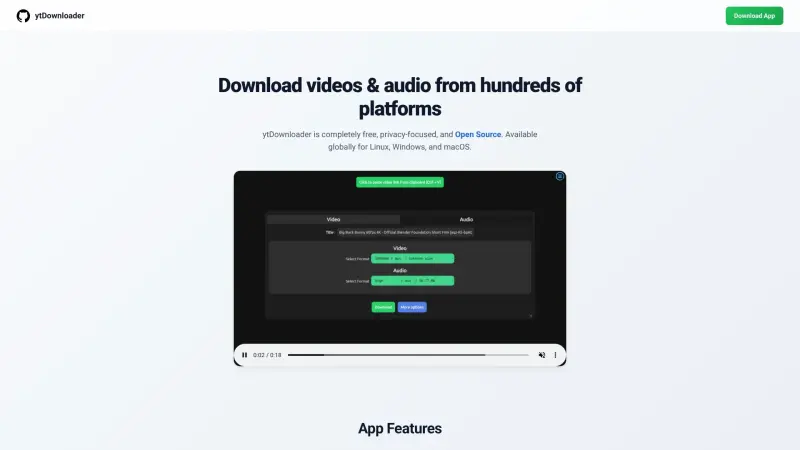
ytDownloader is a free, open-source video downloader that helps users save content from popular platforms like YouTube, Facebook, and Twitter, making it a great tool for those who want to access their favorite videos offline.
Whether you're a student looking to download educational videos, a marketer trying to save social media content for research, or simply someone who wants to enjoy their favorite videos without an internet connection, ytDownloader provides a convenient, easy-to-use solution that fits seamlessly into your daily workflow.
Details
Key Features
- Supports hundreds of platforms, giving users a wide range of options for downloading their favorite content
- Hardware Accelerated Compression, which enables fast and efficient video compression
- Multiple beautiful themes, allowing users to customize the look and feel of the app
- Download specific timestamp ranges, which is useful for saving only the parts of a video that are relevant to you
Best For
- Students who want to download educational videos for offline access
- Marketers who need to save social media content for research and analysis
- Anyone who wants to enjoy their favorite videos without an internet connection, such as travelers or those with limited internet access
Top Use Cases
- Downloading videos for offline viewing, which is useful for daily commutes or travel
- Saving social media content for research and analysis, such as marketing campaigns or competitor research
- Accessing educational videos and resources for learning and development
Integrations
- ytDownloader is available for Linux, Windows, and macOS, and can be installed using various methods, including EXE and MSI builds for Windows, and a community-signed package for macOS that requires some technical setup
Pros
- completely free and open-source
- supports hundreds of platforms
- hardware-accelerated compression for fast and efficient video compression
Limitations
- may require some technical setup for macOS installation
- limited information available on integrations with other apps or services
Read full editorial notes
What is ytDownloader?
ytDownloader is a video downloader that lets users save content from hundreds of platforms, including YouTube, Facebook, TikTok, Twitch, Instagram, and Twitter, in a clean and private way. It is available for Linux, Windows, and macOS, making it accessible to a wide range of users.
What are the key features of ytDownloader?
Supports hundreds of platforms, giving users a wide range of options for downloading their favorite content
Hardware Accelerated Compression, which enables fast and efficient video compression
Multiple beautiful themes, allowing users to customize the look and feel of the app
Download specific timestamp ranges, which is useful for saving only the parts of a video that are relevant to you
Subtitles downloading built-in, making it easy to access and download subtitles for your favorite videos
Who is ytDownloader best for?
Students who want to download educational videos for offline access
Marketers who need to save social media content for research and analysis
Anyone who wants to enjoy their favorite videos without an internet connection, such as travelers or those with limited internet access
What can you use ytDownloader for?
Downloading videos for offline viewing, which is useful for daily commutes or travel
Saving social media content for research and analysis, such as marketing campaigns or competitor research
Accessing educational videos and resources for learning and development
How does ytDownloader compare to alternatives?
Unlike some other video downloaders, ytDownloader is completely free and open-source, making it a great option for those who value privacy and transparency
ytDownloader's support for hundreds of platforms sets it apart from other downloaders that may only support a limited number of sites
What integrations and ecosystem support does ytDownloader offer?
ytDownloader is available for Linux, Windows, and macOS, and can be installed using various methods, including EXE and MSI builds for Windows, and a community-signed package for macOS that requires some technical setup
What are the pros and limitations of ytDownloader?
Pros: completely free and open-source; supports hundreds of platforms; hardware-accelerated compression for fast and efficient video compression
Limitations: may require some technical setup for macOS installation; limited information available on integrations with other apps or services
Built with
Keep researching ytDownloader
Explore relevant products with a similar category, audience, or use case.


Resources
Useful Links
Launched
Ownership
If this is your product, contact us and we can help transfer it to you.
 ChatGPT,
 Claude,
 Perplexity,
 Gemini

