


SideNotes
Stay focused with distraction-free note taking, always at your fingertips
- Use Cases
- Not listed yet
- Pricing View
- One-time Payment
- Platforms
- Not listed yet
- Ideal For
- Students General Productivity
Overview
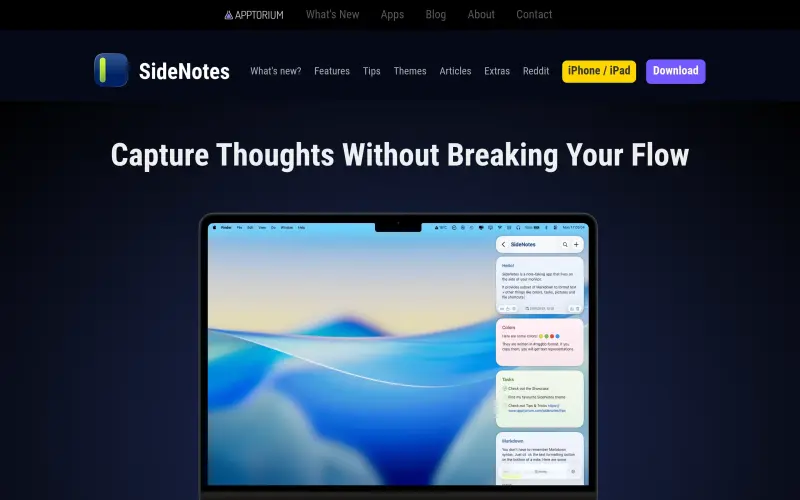
SideNotes – Quick Notes on Screen Side – Apptorium is a note-taking app that helps users manage notes distraction-free, keeping them organized and personalized on the side of their monitor. It's designed for individuals who need to jot down notes quickly without breaking their workflow.
SideNotes is a native macOS app that supports features like Markdown formatting, tasks, images, and folders, making it a useful tool for everyday note-taking needs.
Details
Key Features
- Instant note capture with a slide-in interface that doesn't interrupt your workflow
- Markdown formatting for easy text styling and organization
- Support for tasks, images, and folders to keep your notes structured
- iCloud synchronization for seamless note access across devices
Best For
- Individuals who need to take quick notes without leaving their current app or workflow
- Users who prefer a distraction-free note-taking experience
- Those who value organization and customization in their note-taking app
Integrations
- iCloud synchronization for note access across macOS and iOS devices
Pros
- distraction-free note-taking, customizable organization, and seamless iCloud synchronization
Limitations
- may not be suitable for users who require advanced features or collaboration tools
Read full editorial notes
What are the key features of SideNotes – Quick Notes on Screen Side – Apptorium?
- Instant note capture with a slide-in interface that doesn't interrupt your workflow
- Markdown formatting for easy text styling and organization
- Support for tasks, images, and folders to keep your notes structured
- iCloud synchronization for seamless note access across devices
- Keyboard-driven workflow for efficient note management
Who is SideNotes – Quick Notes on Screen Side – Apptorium best for?
- Individuals who need to take quick notes without leaving their current app or workflow
- Users who prefer a distraction-free note-taking experience
- Those who value organization and customization in their note-taking app
What are the top use cases for SideNotes – Quick Notes on Screen Side – Apptorium?
- Capturing ideas or reminders that come up during work or study sessions
- Organizing tasks and to-do lists with Markdown formatting and checkboxes
- Storing snippets of code or text for later reference
How does SideNotes – Quick Notes on Screen Side – Apptorium compare to alternatives?
- Unlike other note-taking apps, SideNotes is designed to be a minimalistic, distraction-free solution that integrates seamlessly into your workflow
- It offers a unique slide-in interface that sets it apart from more traditional note-taking apps
What integrations and ecosystem support does SideNotes – Quick Notes on Screen Side – Apptorium offer?
- iCloud synchronization for note access across macOS and iOS devices
What are the pros and limitations of SideNotes – Quick Notes on Screen Side – Apptorium?
- Pros: distraction-free note-taking, customizable organization, and seamless iCloud synchronization
- Limitations: may not be suitable for users who require advanced features or collaboration tools
Keep researching SideNotes
Explore relevant products with a similar category, audience, or use case.



Resources
Social Profiles
Useful Links
FAQ about SideNotes
Concise answers based on the product's editorial information.
What operating systems does SideNotes support?
SideNotes is available on macOS 13 or newer, with a separate version for iOS and iPadOS.
Can I access my notes across multiple devices?
Yes, SideNotes supports iCloud synchronization, allowing you to access your notes across all your devices.
Launched
Ownership
If this is your product, contact us and we can help transfer it to you.
 ChatGPT,
 Claude,
 Perplexity,
 Gemini

