

UIDrop
Capture any website's design system for AI prompts
- Use Cases
- UI Design Code Generation
- Pricing
- Free
- Platforms
- Browser Chrome Extension
- Ideal For
- Designers (UX) Developers
Overview
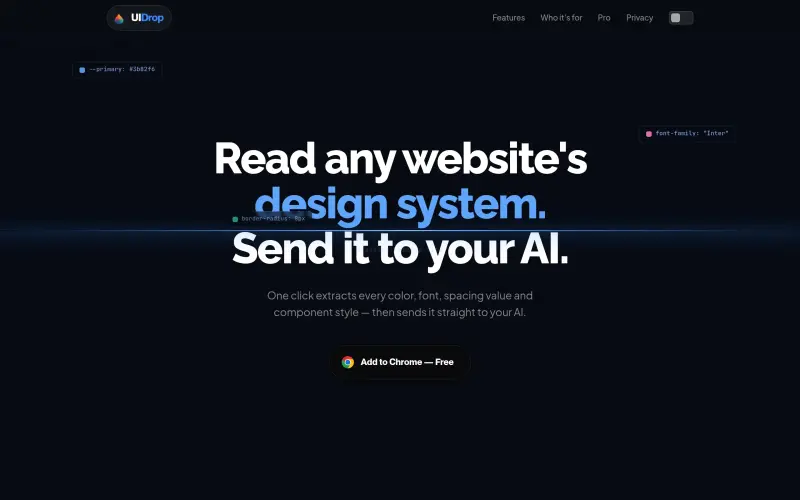
UIDrop is a powerful Chrome extension designed for developers and designers who need to instantly capture a website's full design system, including exact colors, fonts, spacing, and component styles. It streamlines the process of communicating precise visual context to AI models, ensuring your AI-generated code perfectly matches the desired aesthetic from the start.
Instead of manually describing a site's look or hoping an AI guesses correctly, UIDrop provides your AI with precise, implementation-ready design tokens and visual context. This means less back-and-forth and more pixel-accurate results when building UI components or entire dashboards inspired by existing designs.
Details
Key Features
- One-click extraction of a website's complete design system directly from the live DOM, not just source HTML.
- Captures precise design tokens: primary and accent colors, typography families, weights, and size scales, as well as spacing, shadows, radii, and gradients.
- Identifies common UI components like buttons, cards, chips, and inputs, along with their key attributes.
- Automatically detects and processes both light and dark mode styles for a comprehensive design analysis.
Best For
- Developers focused on efficiently reverse-engineering existing user interfaces.
- "Vibe coders" who utilize AI to accelerate the shipping of visually consistent designs.
- Designers seeking to quickly pull, organize, and manage visual references for new projects.
Top Use Cases
- Providing exact design briefs to AI tools for generating pixel-accurate UI elements and layouts.
- Consolidating and merging design systems from multiple websites to inform a single, unique prompt for AI.
- Building new features or entire applications that strictly adhere to a specific design language or aesthetic found online.
Integrations
- UIDrop offers direct integration for sending visual context and design systems to leading AI coding assistants including Claude, ChatGPT, Gemini, Cursor, Lovable, and Manus.
Pros
- Exact token extraction from live DOM
- direct integration with popular AI tools
- permanent library for saved design "snaps"
Read full editorial notes
What is UIDrop?
UIDrop is a Chrome extension that extracts a website's entire design system directly from the live DOM with a single click. It then packages this visual context, including components and design tokens, to be sent straight to popular AI coding assistants.
What are the key features of UIDrop?
- One-click extraction of a website's complete design system directly from the live DOM, not just source HTML.
- Captures precise design tokens: primary and accent colors, typography families, weights, and size scales, as well as spacing, shadows, radii, and gradients.
- Identifies common UI components like buttons, cards, chips, and inputs, along with their key attributes.
- Automatically detects and processes both light and dark mode styles for a comprehensive design analysis.
- Saves all captured "snaps" permanently in a personal library for easy access, reuse, and reference.
Who is UIDrop best for?
- Developers focused on efficiently reverse-engineering existing user interfaces.
- "Vibe coders" who utilize AI to accelerate the shipping of visually consistent designs.
- Designers seeking to quickly pull, organize, and manage visual references for new projects.
What can you use UIDrop for?
- Providing exact design briefs to AI tools for generating pixel-accurate UI elements and layouts.
- Consolidating and merging design systems from multiple websites to inform a single, unique prompt for AI.
- Building new features or entire applications that strictly adhere to a specific design language or aesthetic found online.
How does UIDrop compare to alternatives?
- Compared to manual design system extraction, UIDrop automates the discovery of exact design tokens and component styles, eliminating guesswork and human error.
- When briefing AI, UIDrop provides concrete visual context and implementation-ready tokens, which is significantly more precise than relying on vague textual descriptions or generic AI assumptions.
What integrations and ecosystem support does UIDrop offer?
- UIDrop offers direct integration for sending visual context and design systems to leading AI coding assistants including Claude, ChatGPT, Gemini, Cursor, Lovable, and Manus.
What are the pros of UIDrop?
- Pros: Exact token extraction from live DOM; direct integration with popular AI tools; permanent library for saved design "snaps"
Keep researching UIDrop
Explore relevant products with a similar category, audience, or use case.


Resources
Useful Links
FAQ about UIDrop
Concise answers based on the product's editorial information.
What exactly does UIDrop extract from a website?
UIDrop extracts a comprehensive design system, including primary and accent colors, typography (family, weight, size scale), spacing values, shadows, border radii, and specific attributes for components like buttons, cards, and inputs. It also features auto light/dark mode detection.
Is UIDrop a free tool?
Yes, UIDrop is currently available as a free add-on for Chrome browsers.
Launched
Ownership
If this is your product, contact us and we can help transfer it to you.
 ChatGPT,
 Claude,
 Perplexity,
 Gemini

