

DockFlow
Save and manage multiple macOS Docks for easy workflow switching
- Use Cases
- Task Automation
- Pricing
- Subscription
- Platforms
- MacOS
- Ideal For
- Designers Developers
Overview
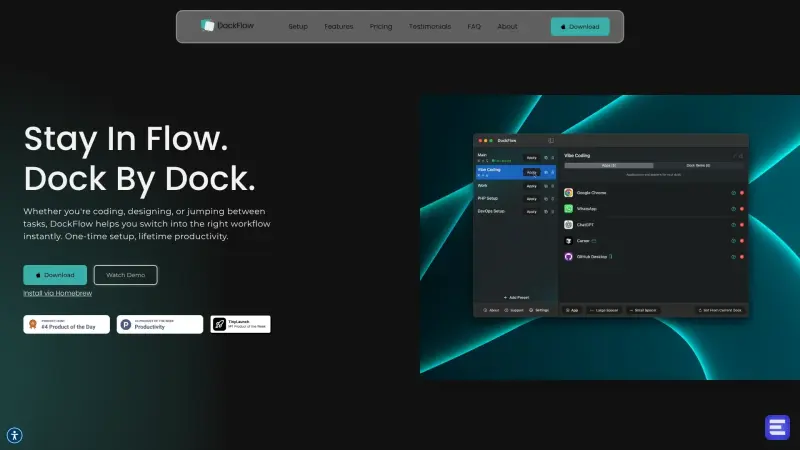
DockFlow helps users switch between multiple macOS Docks to boost productivity
It allows users to save, manage, and switch between different dock setups with ease
Details
Key Features
- Save and manage multiple dock setups
- Switch between dock setups with a single click
- Works with the native macOS Dock without requiring permissions
- Easy setup and customization
Best For
- Users who work on multiple projects or tasks that require different applications
- Those who want to simplify their workflow and reduce distractions
- Anyone looking to increase their productivity on macOS
Pros
- Simplifies switching between different workflows and tasks
- Easy to set up and customize
- Does not require any permissions to work
Limitations
- Requires a license purchase for activation
Read full editorial notes
What is DockFlow?
DockFlow is a tool that enables users to manage multiple macOS Docks. It simplifies switching between different workflows and tasks
What are the key features of DockFlow?
- Save and manage multiple dock setups
- Switch between dock setups with a single click
- Works with the native macOS Dock without requiring permissions
- Easy setup and customization
Who is DockFlow best for?
- Users who work on multiple projects or tasks that require different applications
- Those who want to simplify their workflow and reduce distractions
- Anyone looking to increase their productivity on macOS
What are the pros and limitations of DockFlow?
- Pros: Simplifies switching between different workflows and tasks; Easy to set up and customize; Does not require any permissions to work
- Limitations: Requires a license purchase for activation
Built with
Keep researching DockFlow
Explore relevant products with a similar category, audience, or use case.



Resources
Social Profiles
FAQ about DockFlow
Concise answers based on the product's editorial information.
How do I install DockFlow?
You can install DockFlow via Homebrew by running the command 'brew install --cask dockflow' in your terminal
Do I need to give DockFlow any permissions?
No, DockFlow works with the native macOS Dock and does not require any permissions
Launched
Ownership
If this is your product, contact us and we can help transfer it to you.
 ChatGPT,
 Claude,
 Perplexity,
 Gemini

