


DynamicNotch
Brings dynamic interactions to Mac notches with live activities and custom controls
- Use Cases
- Desktop Enhancement
- Pricing
- Free
- Platforms
- MacOS
- Ideal For
- Solo Makers Indie Hackers
Overview
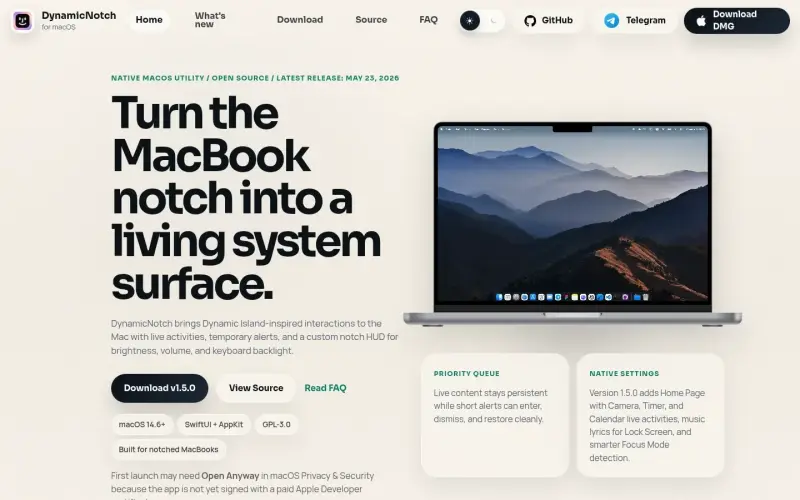
DynamicNotch turns the MacBook notch into a live surface for media, alerts, and hardware controls on macOS
It brings Dynamic Island-inspired interactions to the Mac with live activities and custom notch controls
Details
Key Features
- Live activities and temporary alerts
- Custom notch HUD for brightness, volume, and keyboard backlight
- Priority queue for persistent live content and short alerts
- Native settings with version 1.5.0 adding Home Page with Camera, Timer, and Calendar live activities
Best For
- MacBook users who want to utilize their notch for more than just system information
- Those who want a more interactive and dynamic experience on their Mac
- Users of macOS 14.6 and later
Pros
- Provides a more interactive and dynamic experience on the Mac
- Customizable notch controls for brightness, volume, and keyboard backlight
- Priority queue for managing live content and alerts
Limitations
- First launch may require Open Anyway in macOS Privacy & Security due to lack of paid Apple Developer certificate
Read full editorial notes
What is DynamicNotch?
DynamicNotch is a native macOS utility that transforms the MacBook notch into a living system surface. It provides live activities, temporary alerts, and custom notch HUD controls for brightness, volume, and keyboard backlight
What are the key features of DynamicNotch?
- Live activities and temporary alerts
- Custom notch HUD for brightness, volume, and keyboard backlight
- Priority queue for persistent live content and short alerts
- Native settings with version 1.5.0 adding Home Page with Camera, Timer, and Calendar live activities
Who is DynamicNotch best for?
- MacBook users who want to utilize their notch for more than just system information
- Those who want a more interactive and dynamic experience on their Mac
- Users of macOS 14.6 and later
What are the pros and limitations of DynamicNotch?
- Pros: Provides a more interactive and dynamic experience on the Mac; Customizable notch controls for brightness, volume, and keyboard backlight; Priority queue for managing live content and alerts
- Limitations: First launch may require Open Anyway in macOS Privacy & Security due to lack of paid Apple Developer certificate
Built with
Keep researching DynamicNotch
Explore relevant products with a similar category, audience, or use case.


Resources
Useful Links
FAQ about DynamicNotch
Concise answers based on the product's editorial information.
What version of macOS is required to run DynamicNotch?
MacOS 14.6 or later
Why may the first launch of DynamicNotch require Open Anyway in macOS Privacy & Security?
Because the app is not yet signed with a paid Apple Developer certificate
Launched
Ownership
If this is your product, contact us and we can help transfer it to you.
 ChatGPT,
 Claude,
 Perplexity,
 Gemini

