


- Use Cases
- Pre-Call Preparation
- Pricing
- Free
- Platforms
- MacOS
- Ideal For
- Entrepreneurs
Overview
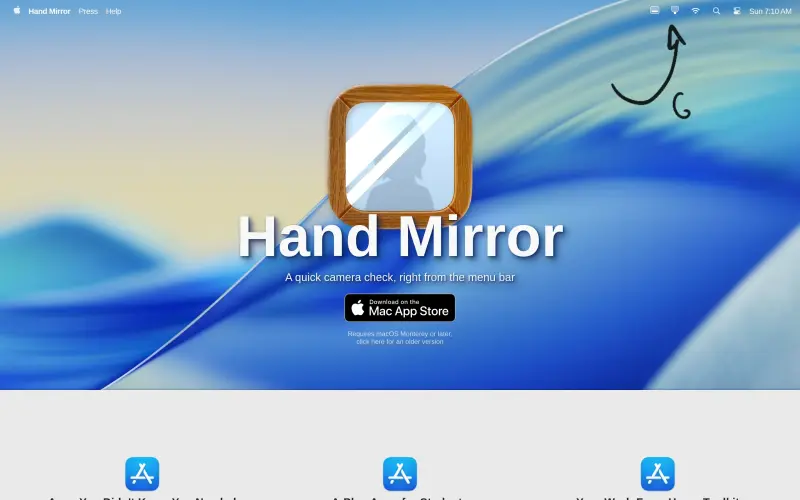
Hand Mirror is a simple yet useful tool that provides a quick camera check right from the menu bar, helping remote workers, students, and anyone who needs to jump on video calls to ensure they're looking their best before joining a meeting.
For those who frequently use video conferencing tools like Zoom, having a quick and easy way to check their camera feed can be a huge time-saver. Instead of opening a separate app like Photo Booth, Hand Mirror offers a convenient solution that lives in the menu bar, letting users check their camera feed with just a click.
Details
Key Features
- A quick camera check right from the menu bar, saving you time and effort
- A simple and intuitive interface that's easy to use, even for those who are not tech-savvy
- Compatibility with macOS Monterey or later, with an older version available for those who need it
- A free version that's available to download and use, with no hidden costs or subscriptions
Best For
- Remote workers who frequently use video conferencing tools like Zoom or Skype
- Students who need to participate in online classes or meetings
- Anyone who wants a quick and easy way to check their camera feed before joining a video call
Top Use Cases
- Checking your face and hair before a video call to ensure you look your best
- Ensuring that your surroundings are tidy and professional before a meeting
- Quickly checking your camera feed to make sure it's working properly before a call
Integrations
- The available source material does not clearly specify integrations, but it is compatible with macOS Monterey or later, with an older version available for those who need it
Pros
- quick and easy to use
- free to download and use
- cute and awesome design
Read full editorial notes
What is Hand Mirror?
Hand Mirror is a macOS app that lives in your menu bar and provides a view from your camera when you click on it. This allows you to quickly check your face, hair, and surroundings before joining a video call, helping you to avoid any embarrassing moments.
What are the key features of Hand Mirror?
A quick camera check right from the menu bar, saving you time and effort
A simple and intuitive interface that's easy to use, even for those who are not tech-savvy
Compatibility with macOS Monterey or later, with an older version available for those who need it
A free version that's available to download and use, with no hidden costs or subscriptions
A cute and awesome design that makes it a joy to use, according to users like Quinn Nelson from Snazzy Labs
Who is Hand Mirror best for?
Remote workers who frequently use video conferencing tools like Zoom or Skype
Students who need to participate in online classes or meetings
Anyone who wants a quick and easy way to check their camera feed before joining a video call
What can you use Hand Mirror for?
Checking your face and hair before a video call to ensure you look your best
Ensuring that your surroundings are tidy and professional before a meeting
Quickly checking your camera feed to make sure it's working properly before a call
How does Hand Mirror compare to alternatives?
Unlike Photo Booth, Hand Mirror is a dedicated app that lives in the menu bar, making it quicker and easier to access
Compared to other camera apps, Hand Mirror is free, cute, and awesome, making it a great choice for those who want a simple and fun solution
What integrations and ecosystem support does Hand Mirror offer?
The available source material does not clearly specify integrations, but it is compatible with macOS Monterey or later, with an older version available for those who need it
What are the pros of Hand Mirror?
Pros: quick and easy to use; free to download and use; cute and awesome design
Built with
Keep researching Hand Mirror
Explore relevant products with a similar category, audience, or use case.


Resources
Social Profiles
Useful Links
Launched
Ownership
If this is your product, contact us and we can help transfer it to you.
 ChatGPT,
 Claude,
 Perplexity,
 Gemini

