

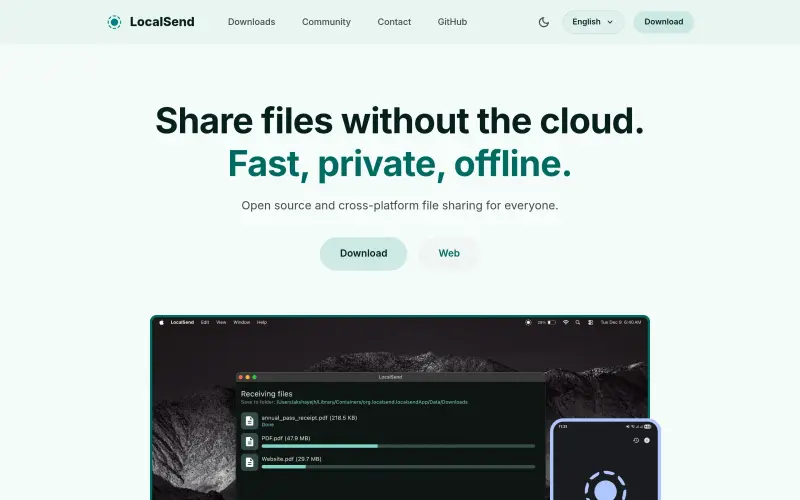

Localsend
Share files offline between nearby devices, fast and private
- Use Cases
- Content Sharing
- Pricing
- Free
- Ideal For
- Small Businesses General Productivity
Overview
Localsend is a free, open-source tool designed for sharing files directly between nearby devices without relying on cloud services. It’s ideal for anyone who needs to quickly and securely transfer photos, videos, documents, or text across various platforms, prioritizing privacy and speed within their local network.
This cross-platform utility simplifies direct device-to-device communication, allowing you to move files instantly between your phone, tablet, and computer without needing an internet connection, accounts, or complex setup. It's a straightforward solution for personal and home use.
Details
Key Features
- **Cross-platform Compatibility:** Available for Windows, macOS, Linux, Android, and iOS, allowing seamless transfers between different operating systems.
- **Enhanced Security:** All transfers use end-to-end encryption via HTTPS, keeping your data private and within your local network, with optional PIN verification for extra protection.
- **No Internet Required:** Functions entirely offline, meaning your sensitive data never leaves your local network and you don't need an active internet connection to share.
- **Blazingly Fast Transfers:** Leverages the maximum speed of your WiFi network, bypassing bandwidth limits often imposed by cloud services.
Best For
- Individuals and families who want to share files privately and quickly between their personal devices.
- Users seeking an alternative to cloud-based file sharing services for local network transfers.
- Anyone needing to move large files between different operating systems (e.g., Android to Windows, iOS to macOS) without cables or internet.
Top Use Cases
- Instantly transfer photos and videos from your phone to your computer or another nearby mobile device.
- Move important documents from your laptop to your tablet for offline viewing or editing.
- Share large files between multiple computers on the same WiFi network without uploading them to the internet.
- Quickly send text snippets or links between your devices without copy-pasting via external apps.
Integrations
- The available source material does not clearly specify integrations with other software or APIs.
- It provides broad platform support across Windows, macOS, Linux, Android, and iOS, functioning as a standalone utility.
- Community support includes active presence on Discord, Reddit, and Mastodon, along with options to become a sponsor or contribute directly to the open-source project on GitHub.
Pros
- Free and open source
- comprehensive cross-platform compatibility
- fast, secure, and private local transfers
- no internet, accounts, or tracking required.
Limitations
- Primarily designed for local network use, meaning it does not facilitate transfers over the internet to remote devices.
Read full editorial notes
What is Localsend?
Localsend is a lightweight application that enables you to send files and text snippets between devices connected to the same local network. It cuts out the middleman, offering a direct, private, and fast way to manage your local file transfers.
What are the key features of Localsend?
**Cross-platform Compatibility:** Available for Windows, macOS, Linux, Android, and iOS, allowing seamless transfers between different operating systems.
**Enhanced Security:** All transfers use end-to-end encryption via HTTPS, keeping your data private and within your local network, with optional PIN verification for extra protection.
**No Internet Required:** Functions entirely offline, meaning your sensitive data never leaves your local network and you don't need an active internet connection to share.
**Blazingly Fast Transfers:** Leverages the maximum speed of your WiFi network, bypassing bandwidth limits often imposed by cloud services.
**Free and Open Source:** Completely free to use, without ads, tracking, hidden costs, or the need for accounts or logins.
Who is Localsend best for?
Individuals and families who want to share files privately and quickly between their personal devices.
Users seeking an alternative to cloud-based file sharing services for local network transfers.
Anyone needing to move large files between different operating systems (e.g., Android to Windows, iOS to macOS) without cables or internet.
What can you use Localsend for?
Instantly transfer photos and videos from your phone to your computer or another nearby mobile device.
Move important documents from your laptop to your tablet for offline viewing or editing.
Share large files between multiple computers on the same WiFi network without uploading them to the internet.
Quickly send text snippets or links between your devices without copy-pasting via external apps.
How does Localsend compare to alternatives?
**Compared to cloud-based file sharing services:** Localsend offers superior privacy and speed for local transfers, as data never leaves your network, and there are no bandwidth limitations or account requirements.
**Compared to proprietary platform-specific tools (like AirDrop):** Localsend stands out with its true cross-platform support, enabling file sharing between any combination of Windows, macOS, Linux, Android, and iOS devices.
What integrations and ecosystem support does Localsend offer?
The available source material does not clearly specify integrations with other software or APIs.
It provides broad platform support across Windows, macOS, Linux, Android, and iOS, functioning as a standalone utility.
Community support includes active presence on Discord, Reddit, and Mastodon, along with options to become a sponsor or contribute directly to the open-source project on GitHub.
What are the pros and limitations of Localsend?
Pros: Free and open source; comprehensive cross-platform compatibility; fast, secure, and private local transfers; no internet, accounts, or tracking required.
Limitations: Primarily designed for local network use, meaning it does not facilitate transfers over the internet to remote devices.
Keep researching Localsend
Explore relevant products with a similar category, audience, or use case.



Resources
Useful Links
Launched
Ownership
If this is your product, contact us and we can help transfer it to you.
 ChatGPT,
 Claude,
 Perplexity,
 Gemini

