Pretty Timezones
Easily coordinate with teams across different timezones and plan meetings with precision
- Use Cases
- Not listed yet
- Pricing
- One-time Payment
- Platforms
- MacOS
Overview
Effortlessly Coordinate Across Time Zones with Pretty Timezones
Managing a global team or working with international clients can be challenging, especially when it comes to scheduling meetings and calls across different time zones, but Pretty Timezones simplifies this process by providing a sleek and intuitive way to compare times across the world.
Details
Key Features
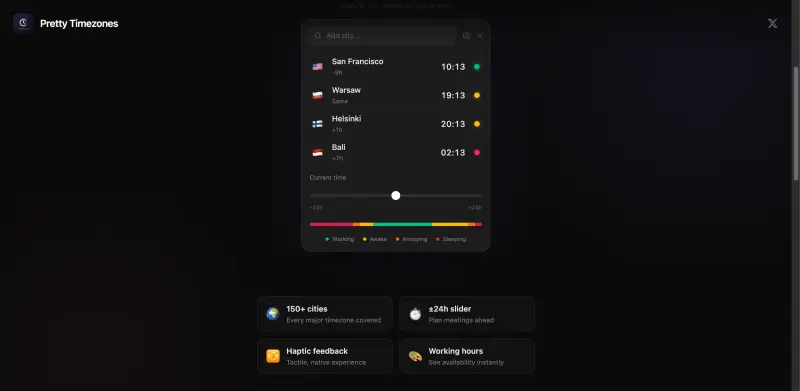
- Instantly know when your team members are available, working, or sleeping, regardless of their location, to plan meetings and collaborations more effectively.
- A tactile, native experience with haptic feedback, ensuring a seamless integration with your macOS workflow.
- Coverage of every major time zone and over 150 cities worldwide, making it an indispensable tool for global teams and international businesses.
- A ±24h slider for planning meetings ahead, allowing you to easily schedule calls and meetings across different time zones.
Best For
- Remote teams and distributed workforces that need to collaborate across different time zones.
- Business owners and entrepreneurs who frequently interact with international clients or partners.
- Travelers and digital nomads who need to stay connected with their team or family back home.
Top Use Cases
- Scheduling international conference calls and meetings without the hassle of manually calculating time differences.
- Coordinating with freelance workers or contractors based in different parts of the world.
- Planning global product launches or marketing campaigns that require precise timing across various time zones.
Integrations
- Designed specifically for macOS, ensuring seamless integration with your existing workflow and other Apple devices.
Pros
- Easy to use, covers all major time zones, and provides a native macOS experience.
Limitations
- Currently only available for macOS, which might limit its adoption in teams using other operating systems.
Read full editorial notes
Key Features
- Instantly know when your team members are available, working, or sleeping, regardless of their location, to plan meetings and collaborations more effectively.
- A tactile, native experience with haptic feedback, ensuring a seamless integration with your macOS workflow.
- Coverage of every major time zone and over 150 cities worldwide, making it an indispensable tool for global teams and international businesses.
- A ±24h slider for planning meetings ahead, allowing you to easily schedule calls and meetings across different time zones.
- Visual indicators of working hours, enabling you to see at a glance when your team members are available, which helps in avoiding misunderstandings and missed opportunities.
Ideal For
- Remote teams and distributed workforces that need to collaborate across different time zones.
- Business owners and entrepreneurs who frequently interact with international clients or partners.
- Travelers and digital nomads who need to stay connected with their team or family back home.
Top Use Cases
- Scheduling international conference calls and meetings without the hassle of manually calculating time differences.
- Coordinating with freelance workers or contractors based in different parts of the world.
- Planning global product launches or marketing campaigns that require precise timing across various time zones.
Known Alternatives
- A more user-friendly and macOS-native alternative to world clock websites or generic time zone converter tools.
- A lightweight and cost-effective solution compared to complex project management software that includes time zone management features.
Integrations & Ecosystem
- Designed specifically for macOS, ensuring seamless integration with your existing workflow and other Apple devices.
Pros & Cons
- Pros: Easy to use, covers all major time zones, and provides a native macOS experience.
- Limitations: Currently only available for macOS, which might limit its adoption in teams using other operating systems.
Frequently Asked Questions
- Is Pretty Timezones available for Windows or other operating systems?
- No, Pretty Timezones is currently exclusive to macOS, but there are plans for potential expansion to other platforms in the future.
- How often is the time zone data updated to reflect changes like daylight saving time?
- Pretty Timezones automatically updates its time zone data to ensure accuracy and reflect changes such as daylight saving time, so you don't have to worry about manual updates.
Alternatives
A shortlist of related products to compare before you leave the page.
Stay productive with a fun companion that tracks your work sessions and activity streaks.
Mac Pet helps you stay focused and on track by providing a fun and interactive way to manage your time, making it an essential tool for anyone looking...
- Customizable Pomodoro timer to help you stay focused and avoid burnout, with personalized work and break sessions tailored to your unique needs
- Seamless integration with your Mac's menu bar or MacBook notch, providing an intuitive and non-intrusive way to track your productivity
- Unique and adorable pixel art pets that bring a touch of personality to your workspace, with each pet having its own distinct animations and behaviors
Easily share custom regions of your screen with colleagues and friends across multiple pla...
It's designed to make screen sharing easier and more precise, especially in situations where you don't want to share your entire screen.
Stay on top of your schedule with personalized call reminders that ensure you never miss a...
Gemma AI is designed to help busy professionals manage their time more effectively by providing intelligent voice call reminders, ensuring that import...
- Customizable reminders that adapt to your schedule, ensuring you're always prepared for upcoming events and tasks, and saving you up to 30 minutes daily in planning and organization.
- Advanced AI technology that learns your habits and preferences over time, providing more accurate and relevant reminders that integrate seamlessly into your daily routine.
- Secure and private, with end-to-end encryption to protect your personal and professional data, giving you peace of mind while using the service.
FAQ
Common questions extracted from the editorial product description.
Is Pretty Timezones available for Windows or other operating systems?
No, Pretty Timezones is currently exclusive to macOS, but there are plans for potential expansion to other platforms in the future.
How often is the time zone data updated to reflect changes like daylight saving time?
Pretty Timezones automatically updates its time zone data to ensure accuracy and reflect changes such as daylight saving time, so you don't have to worry about manual updates.
Launched
Ideal for
Ownership
If this is your product, contact us and we can help transfer it to you.