


Raybeam
Easily share custom regions of your screen with colleagues and friends across multiple platforms and video calls
176 website clicks
Launch week 21, 2026
- Use Cases
- Not listed yet
- Pricing
- One-time Payment
- Platforms
- MacOS
- Ideal For
- Consultants Developers
Overview
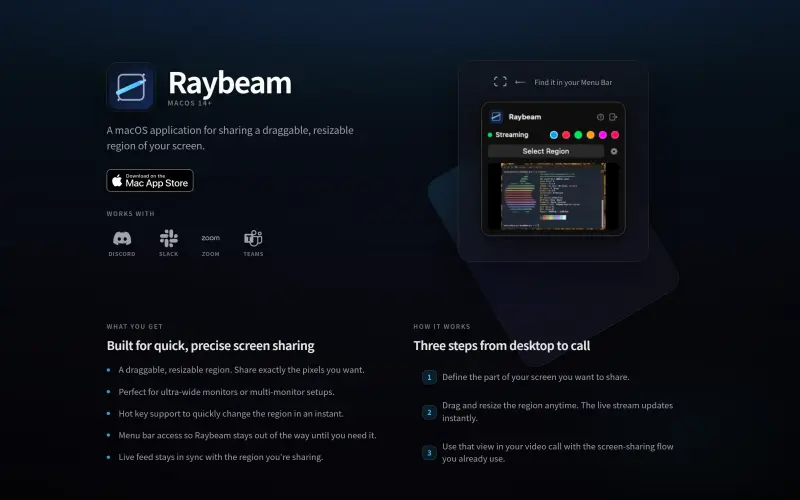
Raybeam is a macOS app for sharing a specific part of your screen, perfect for ultra-wide and multi-monitor setups, and it works with Zoom, Slack, Teams, and more.
It's designed to make screen sharing easier and more precise, especially in situations where you don't want to share your entire screen.
Details
What are the key features of Raybeam?
- You can share a draggable, resizable region of your screen, giving you control over what you share.
- Raybeam works with popular apps like Zoom, Slack, and Teams, making it easy to integrate into your workflow.
- The app stays out of the way in your menu bar until you need it, keeping your screen clutter-free.
- You can use hotkeys to quickly change the shared region, making it easy to adjust on the fly.
- The live feed stays in sync with the region you're sharing, ensuring that everyone sees what you want them to see.
Who is Raybeam best for?
- People with ultra-wide or multi-monitor setups who want more control over screen sharing.
- Users who frequently share their screen in video calls and need a more precise solution.
- Anyone who wants a simple, easy-to-use screen sharing tool that works with their favorite apps.
What are the top use cases for Raybeam?
- Sharing a specific part of your screen during a video call to show a demo or presentation.
- Collaborating with team members and needing to share a specific region of your screen.
- Recording a video tutorial and wanting to focus on a specific part of your screen.
How does Raybeam compare to alternatives?
- Unlike traditional screen sharing tools, Raybeam gives you more control over what you share and is designed specifically for macOS.
- It's a more straightforward solution than using multiple apps or workarounds to achieve the same result.
What integrations and ecosystem support does Raybeam offer?
- Raybeam works with popular apps like Zoom, Slack, Teams, and Discord.
What are the pros and limitations of Raybeam?
- Pros: Easy to use, gives you control over what you share, and works with popular apps.
- Limitations: Only available for macOS, may not be suitable for users who need to share their entire screen.
Keep researching Raybeam
Explore relevant products with a similar category, audience, or use case.


Resources
Useful Links
FAQ about Raybeam
Concise answers based on the product's editorial information.
What platforms does Raybeam support?
Raybeam is a macOS app and works on macOS 14+.
Can I share a specific window or region with Raybeam?
Yes, you can share a specific window or a draggable, resizable region of your screen.
Launched
Ownership
If this is your product, contact us and we can help transfer it to you.
 ChatGPT,
 Claude,
 Perplexity,
 Gemini

