


Remind Me Later
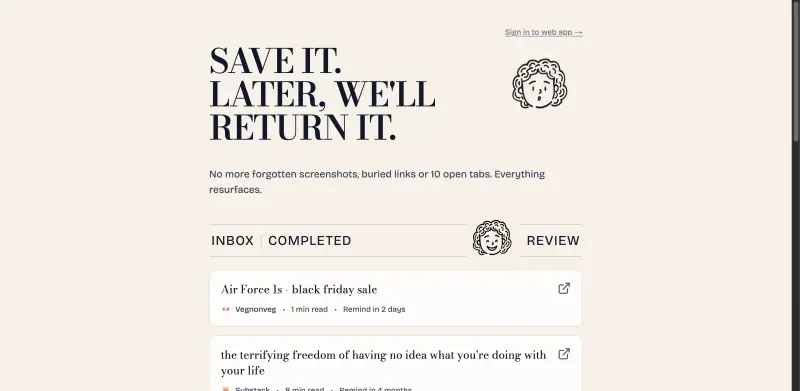
Reclaim your time with a daily digest of saved content, tailored to your schedule and interests.
Overview
Regain Control Over Your Digital Life with Remind Me Later
Remind Me Later solves the problem of information overload by allowing users to save and revisit content at their convenience, eliminating the need for cluttered bookmarks, forgotten screenshots, and noisy notifications.
Details
Key Features
- Customizable reminders that enable users to revisit saved content at a time that suits them, reducing digital clutter and increasing productivity.
- A daily digest feature that consolidates reminders into a single, calm notification, streamlining the user's digital experience.
- A universal saving feature that supports various content types, including tweets, videos, articles, and products, making it a one-stop solution for all online content.
- Flexibility in choosing when to receive reminders, whether it's in a few days, weeks, or even months, allowing users to prioritize their digital interactions effectively.
Best For
- Individuals seeking to declutter their digital lives and improve their online productivity.
- Professionals looking to stay organized and focused in a fast-paced digital environment.
- Anyone overwhelmed by the constant stream of information online and seeking a more manageable way to engage with content.
Top Use Cases
- Saving articles or videos for later when the user doesn't have time to engage with them immediately, ensuring that valuable content isn't lost in the digital noise.
- Keeping track of products or services of interest and receiving reminders at strategic times, such as during sales or promotions.
- Organizing and revisiting educational or inspirational content at intervals that support learning or personal growth.
Integrations
- Works seamlessly across various platforms and devices, ensuring that users can access their saved content anywhere, anytime.
Pros
- Enhances digital productivity, reduces clutter, and provides a customizable experience tailored to the user's needs.
Limitations
- May require an initial setup to fully integrate with the user's existing digital habits and workflows.
Read full editorial notes
Key Features
- Customizable reminders that enable users to revisit saved content at a time that suits them, reducing digital clutter and increasing productivity.
- A daily digest feature that consolidates reminders into a single, calm notification, streamlining the user's digital experience.
- A universal saving feature that supports various content types, including tweets, videos, articles, and products, making it a one-stop solution for all online content.
- Flexibility in choosing when to receive reminders, whether it's in a few days, weeks, or even months, allowing users to prioritize their digital interactions effectively.
- A clean and intuitive interface that makes it easy to save, categorize, and revisit content, enhancing the overall user experience.
Ideal For
- Individuals seeking to declutter their digital lives and improve their online productivity.
- Professionals looking to stay organized and focused in a fast-paced digital environment.
- Anyone overwhelmed by the constant stream of information online and seeking a more manageable way to engage with content.
Top Use Cases
- Saving articles or videos for later when the user doesn't have time to engage with them immediately, ensuring that valuable content isn't lost in the digital noise.
- Keeping track of products or services of interest and receiving reminders at strategic times, such as during sales or promotions.
- Organizing and revisiting educational or inspirational content at intervals that support learning or personal growth.
Known Alternatives
- A more personalized and less intrusive alternative to traditional bookmarking or notification systems, offering users a more tailored experience.
- A simpler, privacy-focused solution compared to using multiple apps or extensions for saving and tracking online content.
Integrations & Ecosystem
- Works seamlessly across various platforms and devices, ensuring that users can access their saved content anywhere, anytime.
Pros & Cons
- Pros: Enhances digital productivity, reduces clutter, and provides a customizable experience tailored to the user's needs.
- Limitations: May require an initial setup to fully integrate with the user's existing digital habits and workflows.
Built with
Keep researching Remind Me Later
Explore relevant products with a similar category, audience, or use case.



Resources
Useful Links
FAQ about Remind Me Later
Concise answers based on the product's editorial information.
How does Remind Me Later handle privacy and data security?
Remind Me Later prioritizes user privacy and data security, ensuring that all saved content and user data are protected and secure.
Can I access my saved content across different devices?
Yes, Remind Me Later is designed to be accessible across various devices, allowing users to save and revisit content from anywhere.
Launched
Ownership
If this is your product, contact us and we can help transfer it to you.
 ChatGPT,
 Claude,
 Perplexity,
 Gemini

