


Brault
AI-powered creative asset management for teams
- Use Cases
- Team Collaboration Content Organization
- Pricing View
- Subscription
- Ideal For
- Content Creators Creatives
Overview
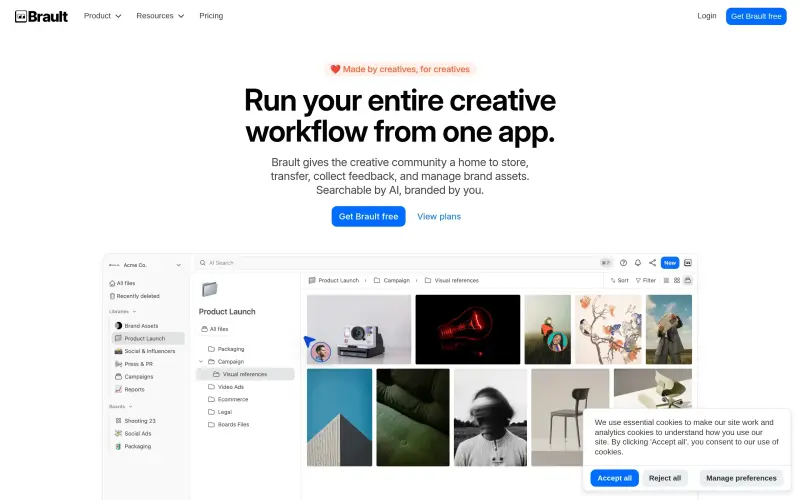
Brault is a file management application purpose-built for creatives, agencies, and teams seeking to centralise and streamline their workflow. It helps you store, organise, share, and intelligently search all your project files using AI. Choose Brault to simplify complex asset management and enhance creative collaboration.
This platform provides a dedicated home for the creative community to manage brand assets, gather precise feedback, and transfer large files efficiently. All your content becomes instantly searchable with AI while remaining your brand, consolidating various essential creative tasks into one intuitive app.
Details
Key Features
- Store all creative assets and files in a single, organised, searchable library.
- Manage projects visually with dedicated boards, tracking statuses, owners, and due dates.
- Collect frame-accurate feedback directly on assets, simplifying review cycles.
- Transfer large files securely to clients or collaborators, branded with your identity.
Best For
- Creatives
- Agencies
- Teams working on visual projects
Top Use Cases
- Centralising all your creative assets, brand guidelines, and project files into a single, organised, and AI-searchable library.
- Collaborating effectively on projects by managing tasks, tracking progress, and gathering precise feedback directly on media files.
- Efficiently transferring large design files, video exports, or project folders to clients and external partners under your brand's identity.
Integrations
- Brault offers a dedicated Desktop app for macOS, compatible with macOS 14 and later.
- The macOS app integrates directly with Finder, allowing for on-demand file storage and seamless syncing.
- It enables sending large files as a native Brault Transfer link directly from your Finder, without needing to open a web browser.
Pros
- AI-powered search for efficient asset discovery
- Streamlines entire creative workflows within a single application
- Dedicated features for creative collaboration, like frame-accurate feedback and branded file transfers
- Offers a native macOS app with Finder integration for seamless desktop use.
Read full editorial notes
What is Brault?
Brault is a file management and collaboration app that brings all your creative assets and workflows into one centralised hub. It helps you store, organise, and share files, streamlining project management from concept to completion.
What are the key features of Brault?
Store all creative assets and files in a single, organised, searchable library.
Manage projects visually with dedicated boards, tracking statuses, owners, and due dates.
Collect frame-accurate feedback directly on assets, simplifying review cycles.
Transfer large files securely to clients or collaborators, branded with your identity.
Utilize AI to instantly search and find any file or asset within your library.
Integrate desktop file management via the native macOS app, offering on-demand storage and direct large file transfers from Finder.
Who is Brault best for?
Creatives
Agencies
Teams working on visual projects
What can you use Brault for?
Centralising all your creative assets, brand guidelines, and project files into a single, organised, and AI-searchable library.
Collaborating effectively on projects by managing tasks, tracking progress, and gathering precise feedback directly on media files.
Efficiently transferring large design files, video exports, or project folders to clients and external partners under your brand's identity.
How does Brault compare to alternatives?
Compared to generic cloud storage solutions, Brault offers specialised AI-powered search, project management, and collaboration tools specifically designed for creative workflows.
Unlike using fragmented tools for file transfer, project feedback, and asset storage, Brault consolidates these essential creative functions into a single, integrated platform.
What integrations and ecosystem support does Brault offer?
Brault offers a dedicated Desktop app for macOS, compatible with macOS 14 and later.
The macOS app integrates directly with Finder, allowing for on-demand file storage and seamless syncing.
It enables sending large files as a native Brault Transfer link directly from your Finder, without needing to open a web browser.
What are the pros of Brault?
Pros: AI-powered search for efficient asset discovery; Streamlines entire creative workflows within a single application; Dedicated features for creative collaboration, like frame-accurate feedback and branded file transfers; Offers a native macOS app with Finder integration for seamless desktop use.
Keep researching Brault
Explore relevant products with a similar category, audience, or use case.



Resources
Social Profiles
Launched
Ownership
If this is your product, contact us and we can help transfer it to you.
 ChatGPT,
 Claude,
 Perplexity,
 Gemini

