


- Use Cases
- Clipboard Management
- Pricing
- One-time Payment
- Platforms
- MacOS
- Ideal For
- Not listed yet
Overview
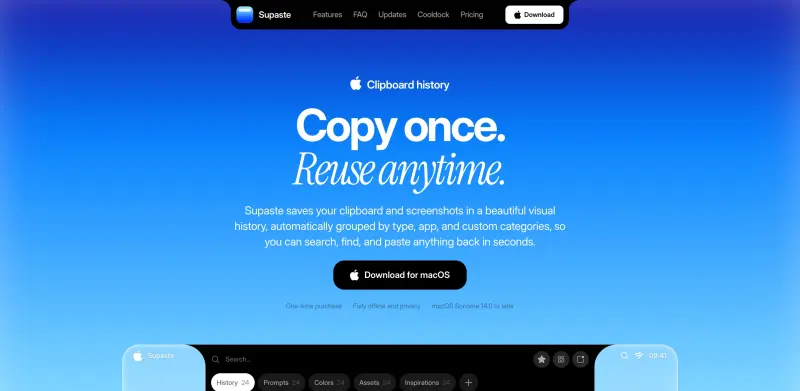
Supaste is a local-first clipboard and screenshot history app for Mac that helps users save and reuse copied text, links, images, files, code, colors, and screenshots in a beautiful searchable timeline. It's designed for individuals who want to streamline their workflow and reduce the time spent searching for previously copied content.
Supaste fits into a user's workflow by providing a convenient and organized way to access their clipboard history. It automatically groups copied content by type, app, and custom categories, making it easy to find and paste anything back in seconds. This app is particularly useful for individuals who work with multiple apps and need to reuse content frequently.
Details
Key Features
- Reusable clipboard history: Supaste saves your copied text, links, images, files, code, colors, and screenshots in a beautiful searchable timeline.
- Automatic grouping: Supaste groups your copied content by type, app, and custom categories, making it easy to find what you need.
- Inline shortcuts: Create quick shortcuts for any clip, allowing you to instantly insert your saved text, link, template, or clip without switching apps.
- Clip reminders: Set reminders on any clip, choosing a quick time, custom date, or getting reminded when you return to the app where the item was originally copied from.
Best For
- Designers: Supaste helps designers keep colors, icons, screenshots, SVGs, gradients, visual references, and assets close at hand in a beautiful, searchable shelf.
- Developers: Supaste automatically saves code snippets, commands, errors, JSON, API responses, and GitHub links, making it easy to find and paste them back whenever needed.
- Content and marketing teams: Supaste helps teams capture and reuse useful pieces of content, such as customer replies, screenshots, links, and personal notes.
Top Use Cases
- Streamlining your workflow: Supaste helps you reduce time spent searching for previously copied content, so you can focus on your work.
- Organizing your clipboard history: Supaste provides a convenient and organized way to access your clipboard history, making it easy to find and reuse content.
- Improving productivity: Supaste's features, such as inline shortcuts and clip reminders, help you work more efficiently and effectively.
Integrations
- The available source material does not clearly specify integrations, but Supaste is designed to work seamlessly with various Mac apps, allowing you to access your clipboard history and reuse content across different applications.
Pros
- Supaste offers a beautiful, searchable timeline
- automatic grouping of copied content
- and inline shortcuts, making it a convenient and organized way to access your clipboard history
- it also provides a local-first approach, ensuring privacy and offline access.
Read full editorial notes
What is Supaste?
Supaste is a Mac app that saves your clipboard and screenshots in a visual history, allowing you to search, find, and paste anything back in seconds. It's a local-first app, meaning that your data is stored on your device, ensuring privacy and offline access.
What are the key features of Supaste?
Reusable clipboard history: Supaste saves your copied text, links, images, files, code, colors, and screenshots in a beautiful searchable timeline.
Automatic grouping: Supaste groups your copied content by type, app, and custom categories, making it easy to find what you need.
Inline shortcuts: Create quick shortcuts for any clip, allowing you to instantly insert your saved text, link, template, or clip without switching apps.
Clip reminders: Set reminders on any clip, choosing a quick time, custom date, or getting reminded when you return to the app where the item was originally copied from.
Quick paste anywhere: Press Control + Command + V in any app to open Supaste instantly and paste what you need without breaking your flow.
Who is Supaste best for?
Designers: Supaste helps designers keep colors, icons, screenshots, SVGs, gradients, visual references, and assets close at hand in a beautiful, searchable shelf.
Developers: Supaste automatically saves code snippets, commands, errors, JSON, API responses, and GitHub links, making it easy to find and paste them back whenever needed.
Content and marketing teams: Supaste helps teams capture and reuse useful pieces of content, such as customer replies, screenshots, links, and personal notes.
What can you use Supaste for?
Streamlining your workflow: Supaste helps you reduce time spent searching for previously copied content, so you can focus on your work.
Organizing your clipboard history: Supaste provides a convenient and organized way to access your clipboard history, making it easy to find and reuse content.
Improving productivity: Supaste's features, such as inline shortcuts and clip reminders, help you work more efficiently and effectively.
How does Supaste compare to alternatives?
Supaste differs from other clipboard apps in its visual and categorization approach, making it easier to find and reuse content.
Supaste's local-first approach ensures that your data is stored on your device, providing an additional layer of privacy and security compared to cloud-based alternatives.
What integrations and ecosystem support does Supaste offer?
The available source material does not clearly specify integrations, but Supaste is designed to work seamlessly with various Mac apps, allowing you to access your clipboard history and reuse content across different applications.
What are the pros of Supaste?
Pros: Supaste offers a beautiful, searchable timeline; automatic grouping of copied content; and inline shortcuts, making it a convenient and organized way to access your clipboard history; it also provides a local-first approach, ensuring privacy and offline access.
Built with
Keep researching Supaste
Explore relevant products with a similar category, audience, or use case.



Resources
Social Profiles
Launched
Ownership
If this is your product, contact us and we can help transfer it to you.
 ChatGPT,
 Claude,
 Perplexity,
 Gemini

